Snow peaks at distance: how I learned
The snow-peak student, writing the day after. The study took one afternoon, 3 h 54 min: 311 steps and 109 images looked at. Every number in brackets (NNN) is an image I opened while working, numbered as in the notebook. Several were overwritten on disk afterwards, and the notebook is the only place they survive. What I chose to teach from this is in TUTORIAL.md.
The brief was one line long in its subject and very long in its ambition: snowy mountains at distance: snowfields, couloirs, cornices and glacier over rock, seen from miles away. voxsim had never had a convincing snowy mountain, and the five real places it simulates see them constantly: Mount Stuart and Dragontail over the Enchantments, Rainier and Baker on clear horizons, the Olympics behind the coast, Glacier Peak from the Skykomish. I was to learn how snow really lies on steep rock, how the seasonal snowline and the glaciers move, what wind does to crests, and how a snow peak reads in value and colour from 5, 20 and 80 km through haze. Then I was to draw it, matching real photos of named peaks: "first its form (the real silhouettes, where the big lights and darks fall, what sits where), then its finer detail."
That sentence about form decided the whole afternoon. Here's what happened, in order, including the parts that didn't work.
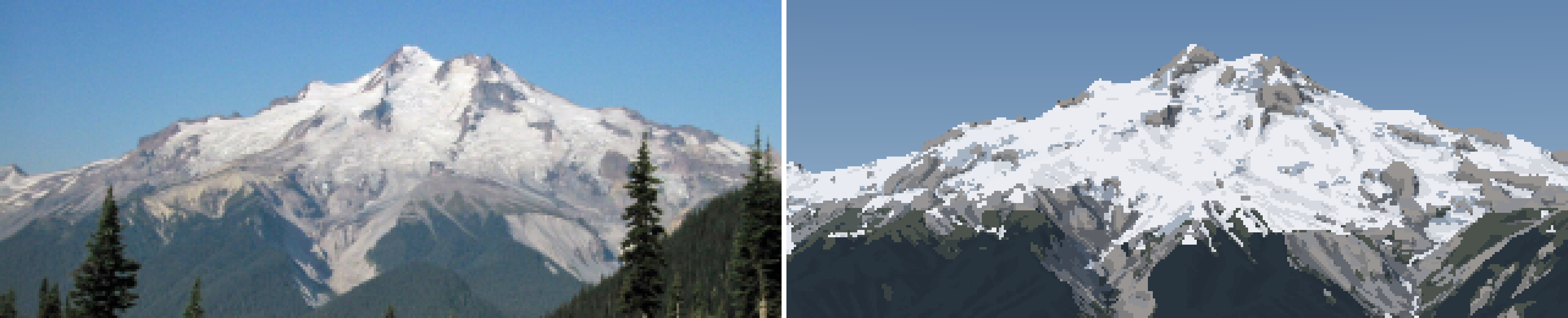
My best pair, at the end: Glacier Peak from the east, 12 km, a late-August morning. On the left, the photo box-downsampled to my pixel grid; on the right, the painting, cast from USGS terrain through the photographer's fitted camera. The silhouette, the summit horns, white upper glaciers over grey lower ice, and the pale dacite aprons are where the photo has them. The sky is too dull, the forest is a slab and the summit rock too dark. More on both below.
1. Reading first
Before fetching anything I read what the studio already knew, and wrote down what I must not relearn:
- The observation student (
posts/observation/TUTORIAL.md): the three-panel sheet, and a ramp coordinate with a jump at the terminator. I also noted their clustered dither, which makes seams read as strings and clumps rather than salt. - The aerial student, how-to 4 (the far view: depth bands, band collapse, cavity tone) and how-to 5 (mountain ground, snow drawn in its shadows). Their own weakest cell was far snow: "salt-and-pepper", because they thresholded noise. Lesson: blur before you threshold, and far snow needs its own simplification. And a number I used all afternoon: shaded snow L* 76 against shaded rock 51 (Sawtooth).
- The snow student (
POST.md), quoting Ferrari: "on mountains the rock defines the snow". Few big shapes, and the haze must not kill the subject's rock-to-snow contrast. - The rock student (
elements/rock/LESSONS.md): they had fitted a camera to a photo of Dragontail's skyline (IoU 0.94) and taken "the value statement from the photo". That was the idea I built on hardest. - The naturalist's geology desk (
naturalist/geo/03glaciation,10alpine and periglacial): cirques, moraines, nivation hollows, solifluction lobes.
The rock student's move is the one I took furthest. Everyone before me drew invented mountains from noise or hand profiles. I had real DEMs of every peak in the brief. I could draw the real mountain, from the real place the photographer stood. Then "match its form" is no longer an aspiration. It's a camera fit.
2. Data and references
The DEM tiles were already on disk: USGS 3DEP 1/3 arc-second (~10 m) covering all four peaks and Seattle, plus ESA WorldCover 2021 at 10 m, whose class 70 (snow and ice) is a glacier map, class 10 is trees and class 60 is bare ground. src/dem.py reprojects any box onto one UTM 10N grid:
T = dem.load_box(e0, e1, n0, n1, res, tag=...) # dict: Z (m), ice, trees, bare, x0, y0, res
Four 20 km boxes loaded in 35 s with a peak RSS of 12 MB (windowed reads). A hillshade with the ice overlay was the first picture (013):
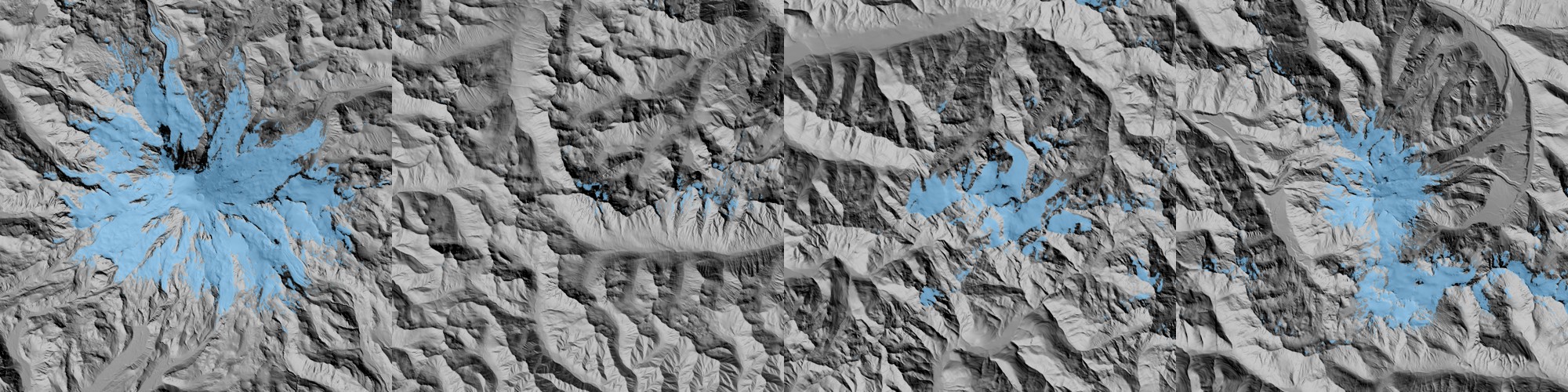
Rainier, Stuart, Olympus and Glacier Peak: 20 km boxes at 20 m, with WorldCover snow and ice in blue. Rainier's glaciers radiate like a starfish. Stuart has almost none (0.6% of the box). This map is what the glaciers are, not a model of them.
For photos I ran 20 queries through the studio's imgfetch.py (contact sheets like (001) and (003)), then fetched the Wikimedia Commons metadata for the key ones, because Commons often records the camera's GPS position. That position is what makes a camera fit possible. The answer keys I chose:
| shot | distance | date |
|---|---|---|
| Rainier from Elliott Bay, Seattle | 96 km | 2009-08-01 20:52, hazy evening |
| Rainier from the Seattle Municipal Tower | 94 km | clear May evening |
| Rainier "20200906", west side | 16 km | September, alpenglow |
| Rainier from Silver Queen Peak | 21 km | 2015-07-01 noon |
| Mount Stuart "7814p" | 5.6 km | July 2008 |
| Glacier Peak "7118" | 12 km | 2003-08-30 09:20 |
| Olympus from Hurricane Ridge | 25 km | July |
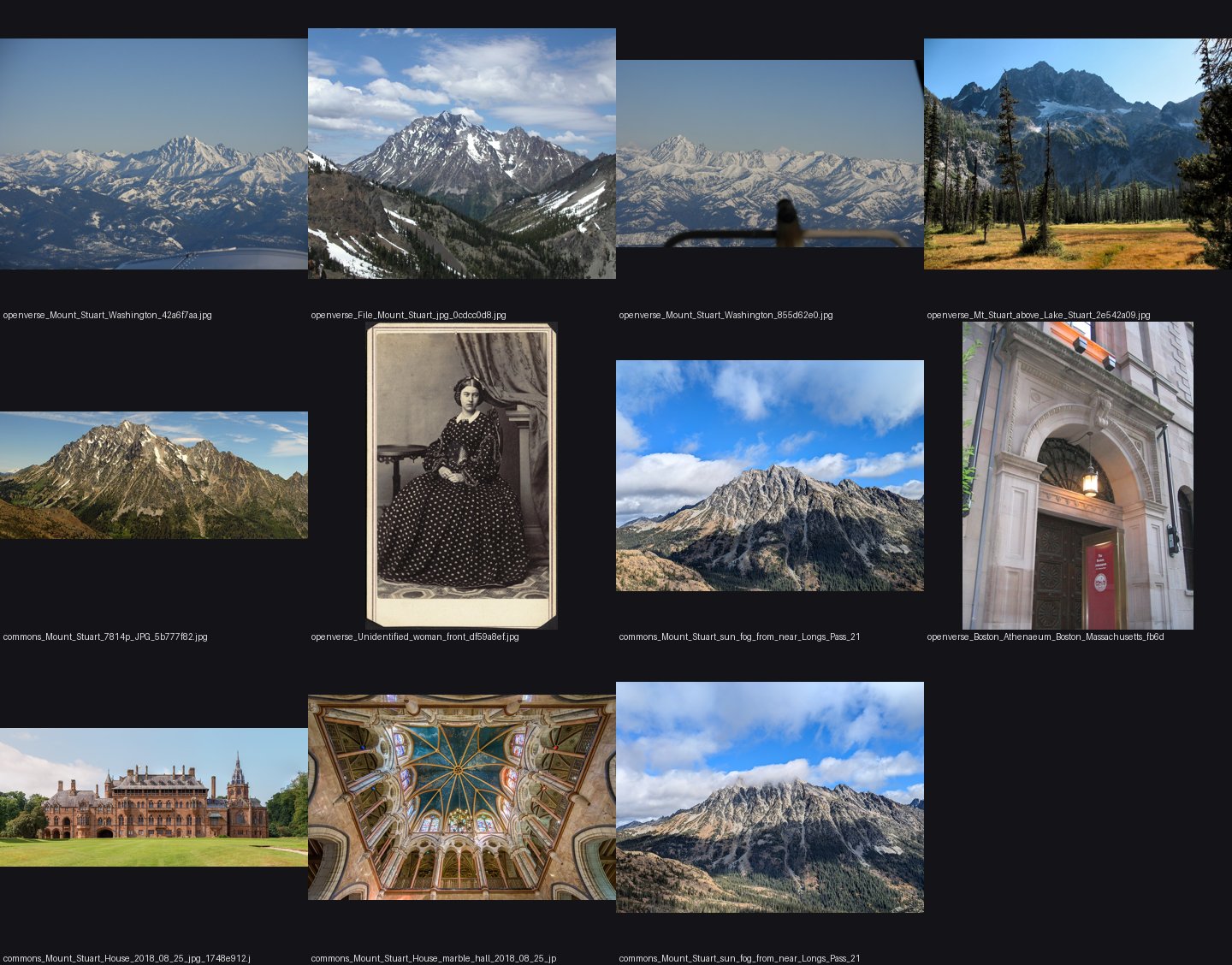
One of the contact sheets (001). I looked at these to choose answer keys by light and date, not by beauty.
3. Numbers before pictures
Then I read for the physics, because the brief asked for observation "good enough that a simulation could use it". The key sources and what each gave:
- SnowSlide (Bernhardt & Schulz 2010): gravitational snow transport. Every cell holds at most a snow holding depth that falls exponentially with slope, and the excess slides to lower neighbours. Their default gives 3.08, 1.11, 0.45 and 0.15 m at 30, 45, 60 and 75°.
- OGGM's Snowslide implementation, read from their source (
snd_max_exponential(slp, a, c, min)): the same law with defaults c = 145, a = 0.14/°, min 0.05 m. That is much steeper: 2.2 m at 30°, 0.27 m at 45°, 0.03 m at 60°. I noted both. The photos later chose (section 10). - Haberkorn et al. (Gemsstock snow pits on 50–65° walls): snow depth did not fall with angle up to 70°. Rough rock holds snow on ledges.
- Glacier ELAs: Nisqually ~3,180 m, Emmons ~2,800 m; Blue Glacier on Olympus with a mean firn limit around 1,725 m; South Cascade 1,900 m.
- Winstral Sx for wind exposure: the maximum upwind slope angle within 300 m. Crests (Sx < 0) scour and lees (Sx > 0) load.
- Cornices grow on lee crests fastest at 1–2× the drift threshold wind.
4. A camera over the real terrain
src/cam.py casts one ray per pixel over the DEM (numba, parallel). At long range, the curve of the earth matters: at 96 km the terrain drops d²/(2R_eff) ≈ 630 m below the tangent plane, with R_eff = R/(1 − 0.13) for standard refraction. I bend the terrain instead of the ray:
pz = cz + dz * t + th * th / (2 * reff)      # ray height in the bent-terrain frame
g = _h(Z, x0, y0, res, px, py)               # bilinear DEM height
above = pz - g
if above <= 0: ...bisect 18 times...         # refine the hit
step = max(above * 0.5, 0.35 * res + t * 0.0002)   # march: big steps high above the ground
The first depth render, Rainier from the Elliott Bay GPS point, took 9.5 s for 640×427 (015):
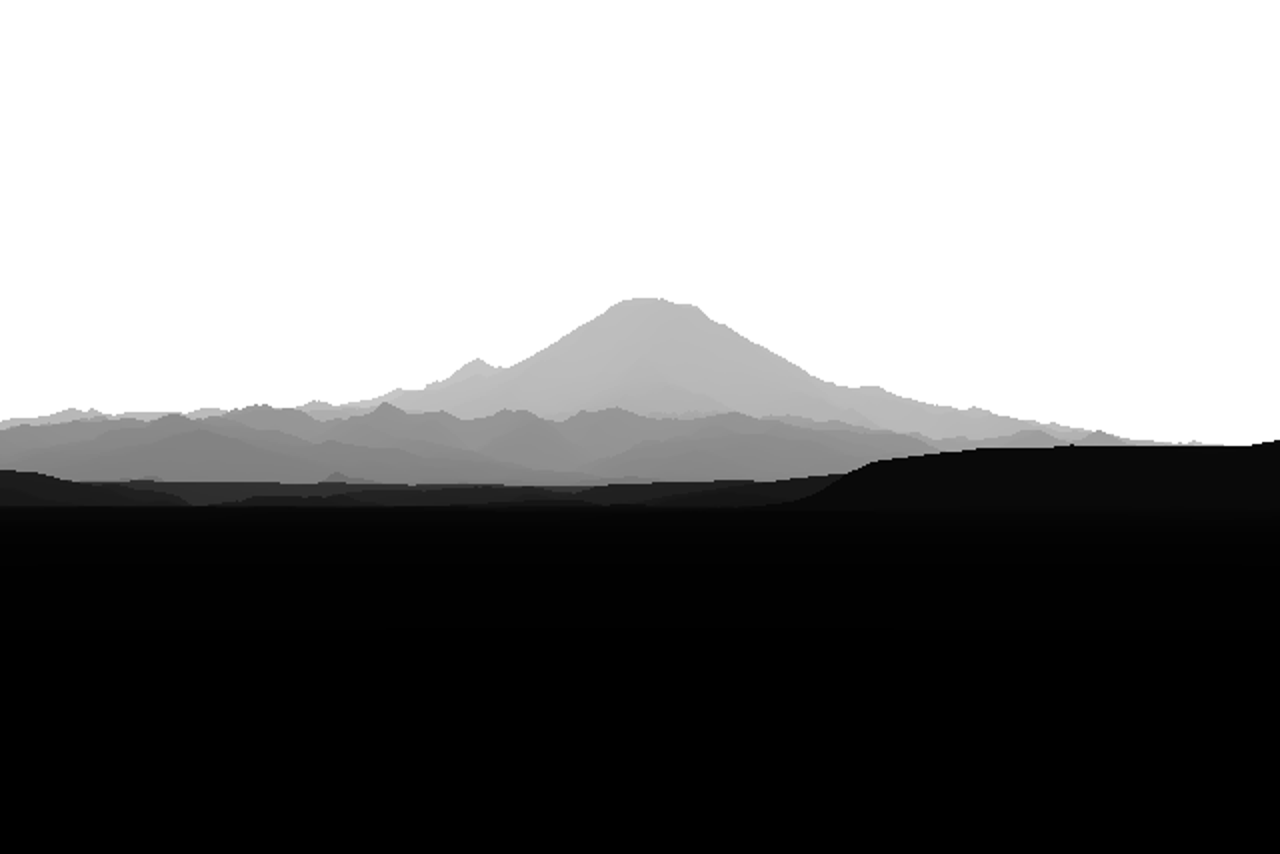
The first cast: Rainier from Elliott Bay, 96 km, depth as grey (nearer is darker). The foothills sink behind each other, and the peak stands on a horizon that has dropped with the earth's curve.
5. Fitting the camera, and the sky mask that failed
The GPS fixes where the camera stood; it doesn't say where it pointed, or the lens. So I needed heading, pitch, field of view and roll.
My first idea was to find the skyline in the photo by colour: model the sky as a colour that varies linearly by row, fitted on the top rows, and mark where the image leaves it. On the hazy Seattle photo that failed at every threshold (016):
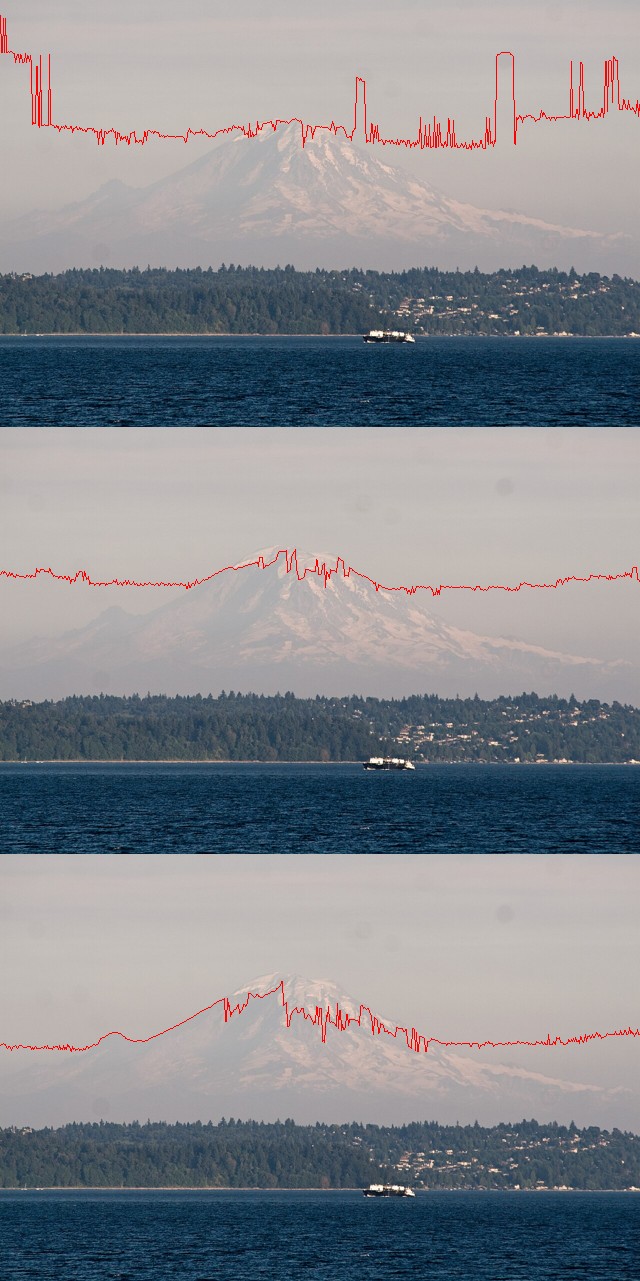
Colour sky masks at three thresholds. The haze makes the peak nearly the colour of the sky, and the sky gradient breaks the linear model: the "skyline" jumps between the top of the frame, a band in mid-sky and the snow texture.
What worked was to stop segmenting the photo. Instead I asked: if the camera were here, is there an edge in the photo where the render has a silhouette? The score is the photo's Lab gradient sampled along the render's silhouettes (the sky boundary plus depth jumps of more than 15%). And because the position is fixed, every candidate view is a resampling of one panorama cast from that point, so fitting costs image warps, not ray casts:
def silhouette(dist, jump=1.15):
    up = np.roll(dist, 1, 0); up[0] = dist[0]
    return (dist < 1e8) & ((up >= 1e8) | (up > dist * jump))

def score(p, P, E, W, H, mask=None):
    d = warp(P, p, W, H)            # the panorama resampled for camera p = (az, pitch, hfov, roll)
    s = silhouette(d)
    if mask is not None: s &= mask  # only the top of the frame (foreground trees aren't in a bare-earth DEM)
    return -E[s].mean()             # E: photo edge strength, blurred
Nelder–Mead at three blur levels (3, 1, 0.3 px) found az 150.63°, pitch 1.155°, hfov 7.94°, roll −0.05° (017):
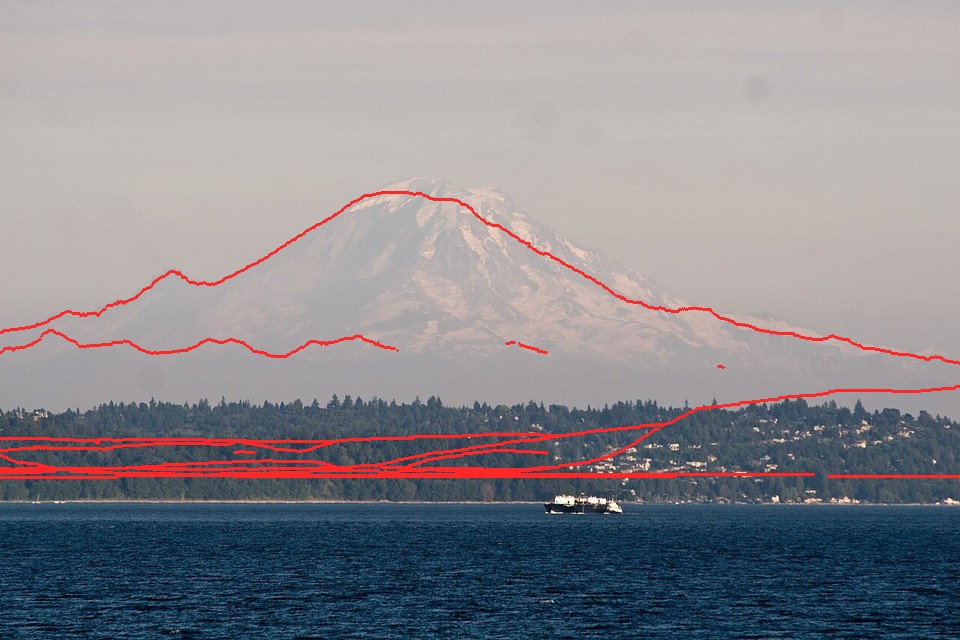
The first fit. The red silhouette lands on the summit, the left shoulder and the long right ridge. The near shore is too low in the render: trees about 40 m tall are not in a bare-earth DEM, so I mask the bottom of the frame out of the score.
Grunt work. The disk filled at this point (5.4 GB free), because I was pickling panoramas with float64 arrays I didn't need. Panoramas went to np.savez as float32 distance only, a quarter of the size, and the study folder stayed under 1 GB after that.
6. The west side: a fit that never worked
The September photo from Rainier's west side was the one I wanted most (late-season snow, alpenglow). Its fit came out sensible-looking but wrong. The panorama from its GPS point explained why (023):
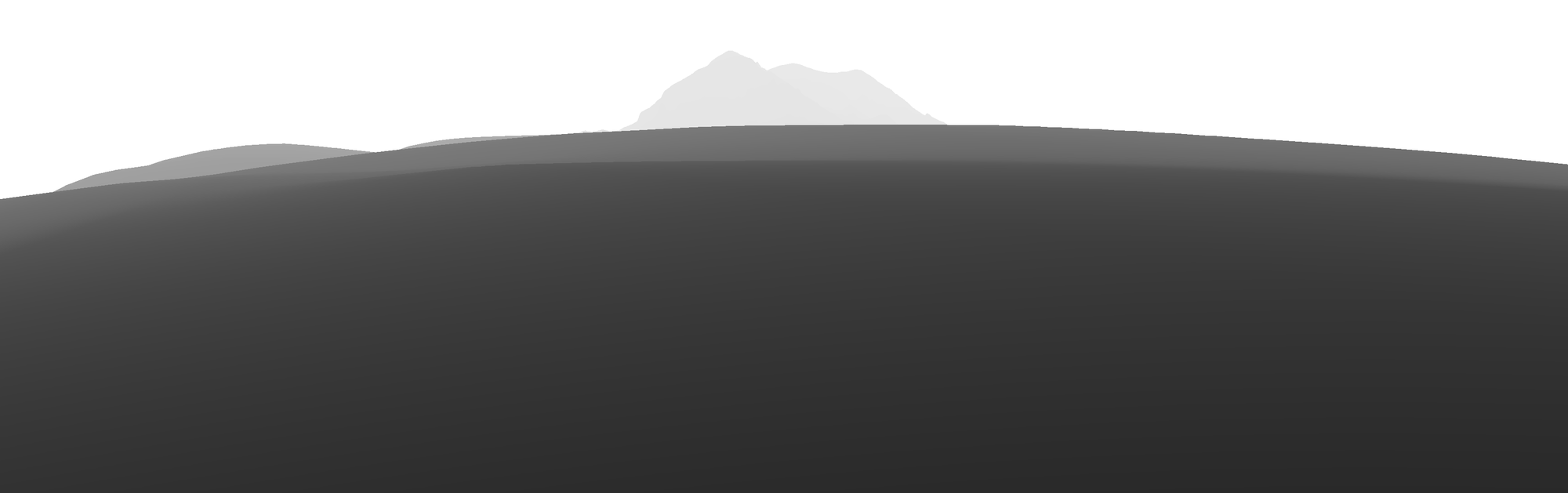
The panorama from the GPS tag: the camera sits in a hollow, and a hill 200 m away blocks everything except the top of the peak.
Photographers stand on high points; GPS tags don't always. I added a snap, which moves the camera to the highest cell within a radius:
if s.get("snap"):     # photographers stand on high points: move to the highest cell within snap m
    win = T["Z"][r0-k:r0+k+1, c0-k:c0+k+1]; ...
    ce += (j-k) * T["res"]; cn -= (i-k) * T["res"]
At 300 m and then at 1.5 km, it moved the camera out of the hollow but the fit still failed. Then I wrote possearch.py: local high points on a 1 km grid over 9×9 km around the fix, each with a coarse panorama and a control-point fov scan. The best five candidates scored −0.52 to −0.54, all within noise of each other, in different places. The tag is simply not where the photo was taken (048):
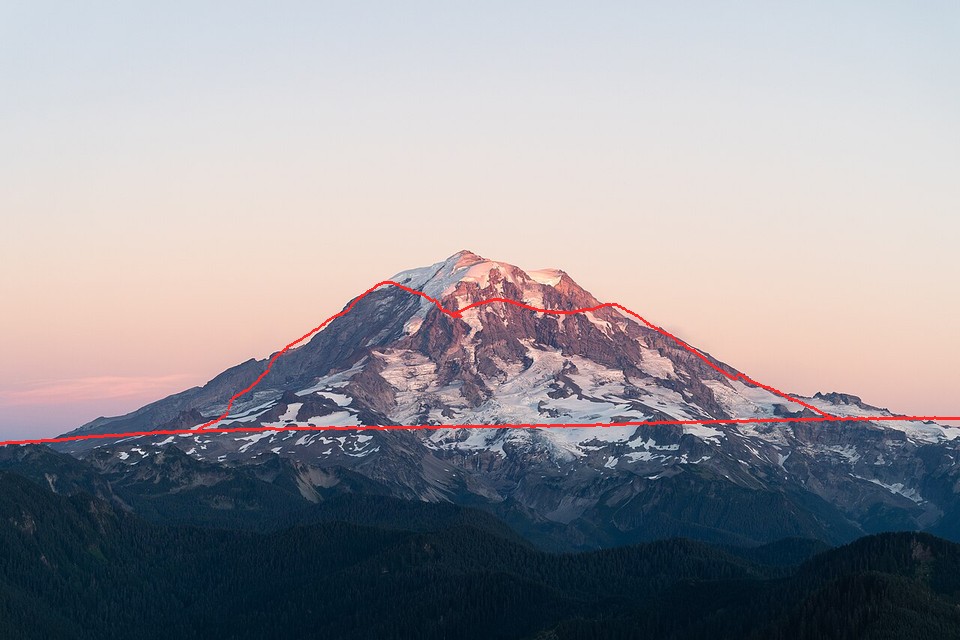
The last attempt at the west-side fit. The red silhouette crosses the face instead of following the skyline. I parked this photo and used it by eye only.
This failure taught me the move that fixed all the others. Nelder–Mead from a guessed heading falls into local optima: it will happily align the skyline with a nearby ridge line. But I know where the summit is in the photo. So I pinned it: put the summit's world position on its photo pixel, scan the field of view, and start the optimiser from the best one.
for fv in np.linspace(*s["fovs"], 26):                       # e.g. 15-45 deg
    f = 0.5 / np.tan(np.radians(fv) / 2)
    dx = np.degrees(np.arctan((s["summit"][0] - 0.5) / f))    # summit pixel -> angle off-axis
    dy = np.degrees(np.arctan((0.5 - s["summit"][1]) * ar / f))
    p = (az_s - dx, el_s - dy, fv, 0.0)                       # az_s, el_s: bearing/elevation of the real summit
    sc = fit.score(p, P, Eb, 480, H, M)
With the control point, the Silver Queen photo (Rainier from the northeast, 21 km, July noon) fitted almost perfectly. Even the foreground ridges line up (050):
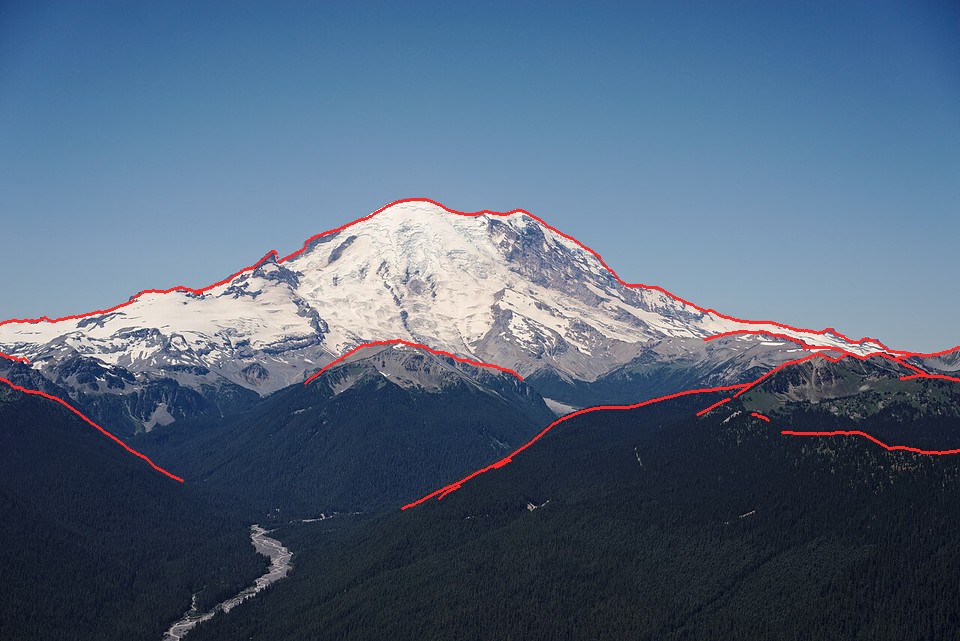
Rainier from Silver Queen Peak, 21 km. The skyline, Little Tahoma on the left, and three foreground ridge lines all land on the photo's edges. This became my main answer key.
The Seattle tower photo (94 km) fitted well too (054).
7. The library arrives: Imhof and Ruskin
Mid-afternoon the coordinator added a studio library of model systems, "so studies can start where the experts finished." Two books mattered to me, and I read them properly.
Eduard Imhof, Cartographic Relief Presentation. The PDF is a scan with no text layer (pdf page = book page + 18), so I read the pages as images. I read chapter 9 on shading and aerial perspective, and chapter 11 on rock drawing. What I took:
- Aerial perspective (§8, p. 172–173): "dark tones grow lighter and light tones are subdued... contrast progressively reduced." And cartographers do the opposite of nature on purpose: "one should sharpen and increase the contrasts of light and shadow towards higher altitudes, but subdue them somewhat in the low lying regions."
- Snow (§18–19): shading on snow must keep the same strength as on the rest of the terrain, or snow ridges read as plateaus. Shadows on snow are pure blue.
- The "normal group of forms" of a rock wall (ch. 11 §3, Figure 170): parallel gullies with ribs between them, acute-angled "poplar tree" branching, steepest near the top, with triangular frontal facets and a debris cone at the foot of every gully.
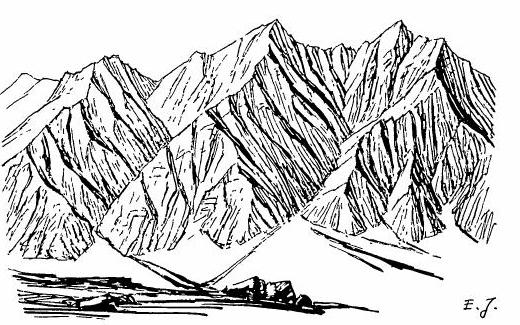
Imhof's Figure 170, "Gullies in a rock wall consisting of homogeneous rock. Group of normal forms." This drawing is my model system for where summer snow lies: in the channels, never on the ribs.
John Ruskin, Modern Painters IV (this one had a text layer). He names the value problem exactly. The distant rocks of the upper peaks "are themselves, when in light, paler than white paper... yet, as compared with their snow, they are so dark that a daguerreotype taken for the proper number of seconds to draw the snow shadows rightly, will always represent the rocks as coal-black." And he gives me the shape: rock ridges "showing in black points like arrow-heads through the snow, where their ridges are left projecting by the avalanche channels."
Together they say what the drawing has to be. Gullies hold snow; ribs are dark arrowheads; the shading is as strong on the snow as on the rock. Everything from section 10 on is me trying to make the code do that.
8. The snow model, the scene, and the first check
src/snowmodel.py stacks the published processes:
- accumulation grows with height: 0.45 m depth per 100 m above 300 m, capped;
- wind: depth × clip(1 + 0.035·Sx, 0.15, 2.5);
- gravity: each cell holds
SHD(slope) = c·exp(−a·slope), and the excess slides to lower neighbours (multiple flow directions, processed from the top down); - melt: a season snowline z_sl for flat undisturbed snow, scaled by clear-sky insolation over the melt season with cast shadows;
- glaciers: WorldCover ice cells stay white firn where the seasonal snow survives and turn grey bare ice where it has gone.
src/scene.py binds a fitted camera, the DEM and the snow model into a per-pixel G-buffer: normal, distance, height, ice/trees/bare fractions, snow cover, sun visibility and curvature. The first look was a plain physical render, no painting (051):
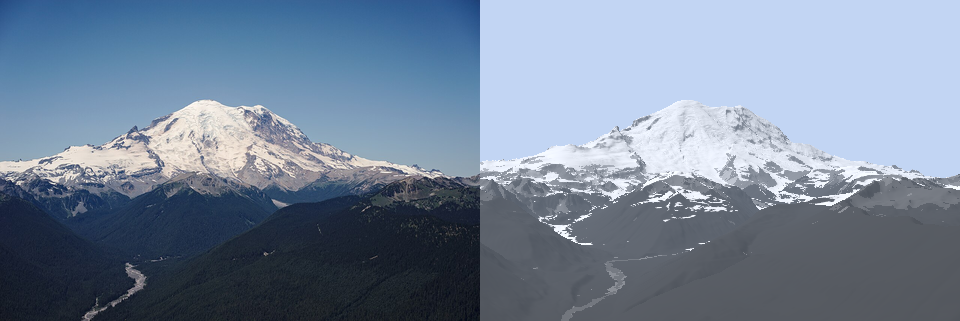
The photo and a plain physical render (albedo × light, simple haze) from the fitted camera. It's already recognisably the same mountain, which is the point of starting from real terrain.
Then I compared snow directly. I thresholded the photo's L* for snow and the model's cover at 0.5, over the terrain above 1,500 m (052). White is both, blue is photo only, orange is model only:
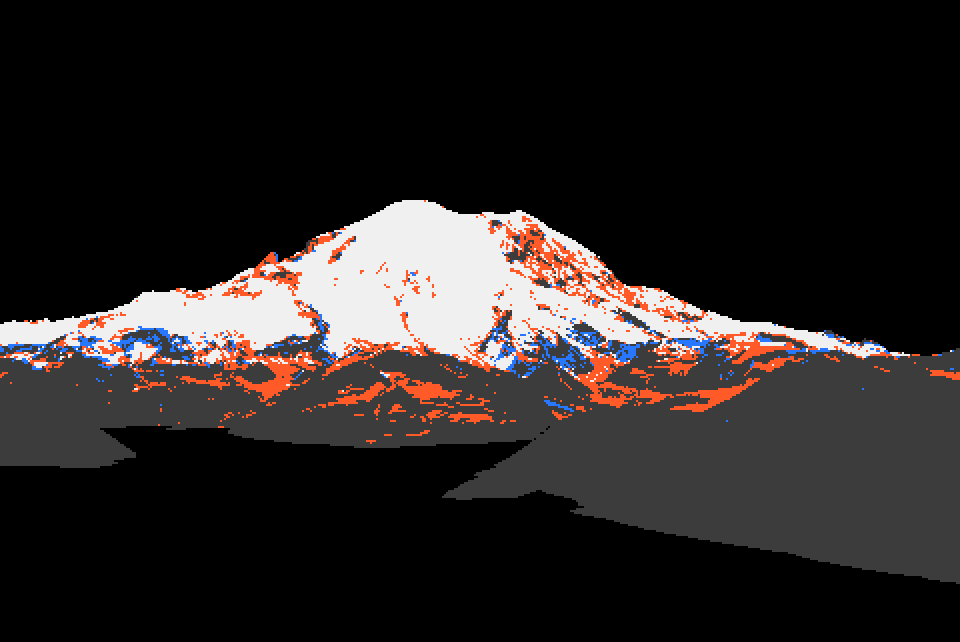
Model against photo, IoU 0.68. The summit dome agrees. The model puts too much snow on the steep lower rock (orange): that was the first sign that the holding depth was too generous. I didn't act on it yet.
Running the model per season was slow (60 s), so I split it into prepare(), the expensive part (fields, wind, gravity, insolation), cached per peak, and apply(prep, season), the cheap part (melt, glacier state, cover). A sweep of the snowline over 1,500–2,500 m gave IoU 0.67–0.72: best around 1,900–2,100 m for early July.
9. Measuring the photos
With a fitted camera, every photo pixel has a known distance and a known material. The photo stops being a picture and becomes an instrument. src/measure.py takes the median Lab by class (snow and rock, lit and shade, forest, sky) using the G-buffer to know what each pixel looks at; src/boxes.py samples named boxes by hand.
- Rainier at 21 km, clear July noon: lit snow L* 91, sky at the peak 64, sky high 47 (b* −29), rock wall 36–54 (b* −11: the haze is already blue at 20 km), forest at 5 km 21.
- Rainier at 94 km, clear May evening (055): lit snow L* 65 against sky 58. That's only +7. The foothills are 45, the darkest thing on the horizon.
- Rainier at 96 km, August dusk: snow 73, rock 69, sky 74. The snow equals the sky: not haze, but weak alpenglow.
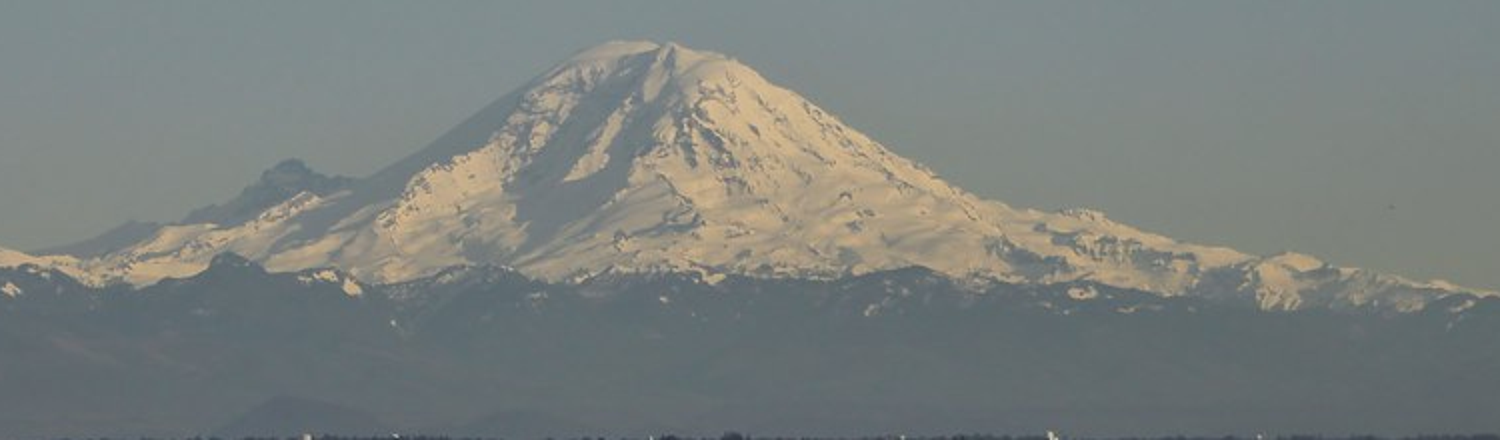
Rainier at 94 km on a clear evening: a pale shape a hair lighter than its sky, warmer than it (b* +11 against −2), standing on the darkest band in the picture.
I'll come back to one more measurement, the most important one, in section 11.
10. The painter, v1 to v9 on Rainier
src/paint.py paints into an index canvas (material, family, step, haze band) and the palette is computed from light, as in every good study here. src/render.py renders the fitted scene at 3× supersampling and puts the photo, box-downsampled to the same 320 px, beside the painting.
v1 (057). The silhouette is right from the DEM; everything else is wrong:
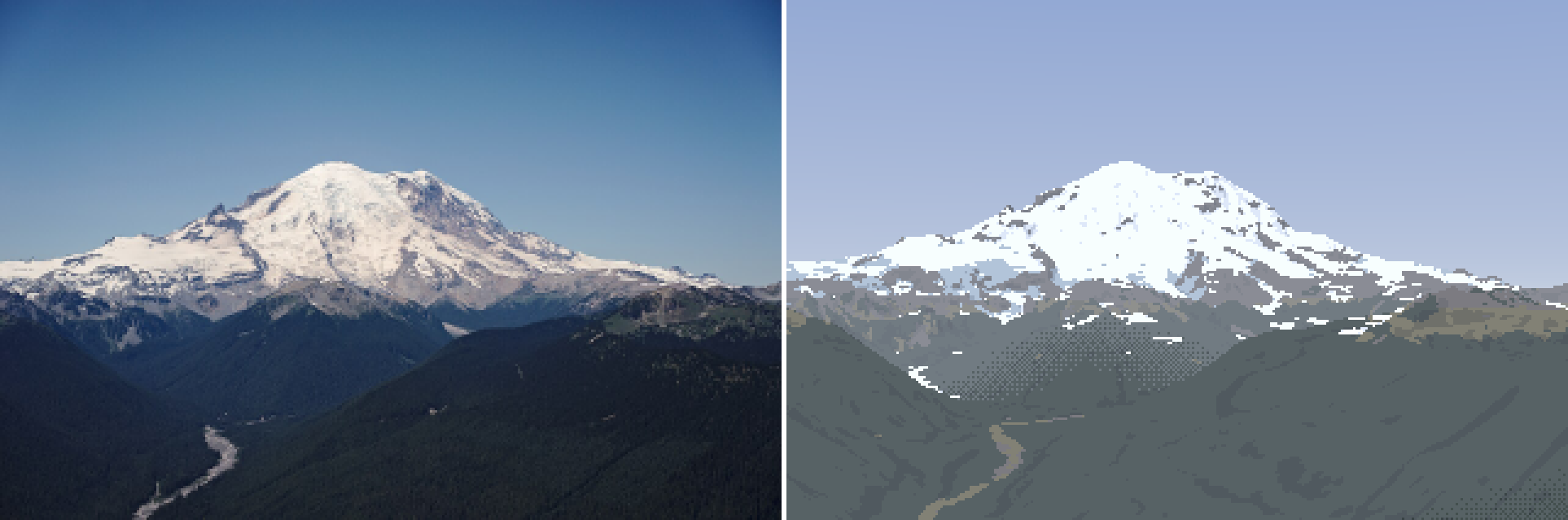
v1. The form is right, the surface is grey and hazy. The snow edge is a scatter of dashes, the lower glaciers are blue patches, and a checker dither sits on the valley.
I wrote palcheck.py to print the L*/b* of every palette entry: the sky zenith came out at L* 61 against the photo's 47, too pale. Then dbg_mat.py showed the material, family and band maps side by side (059):
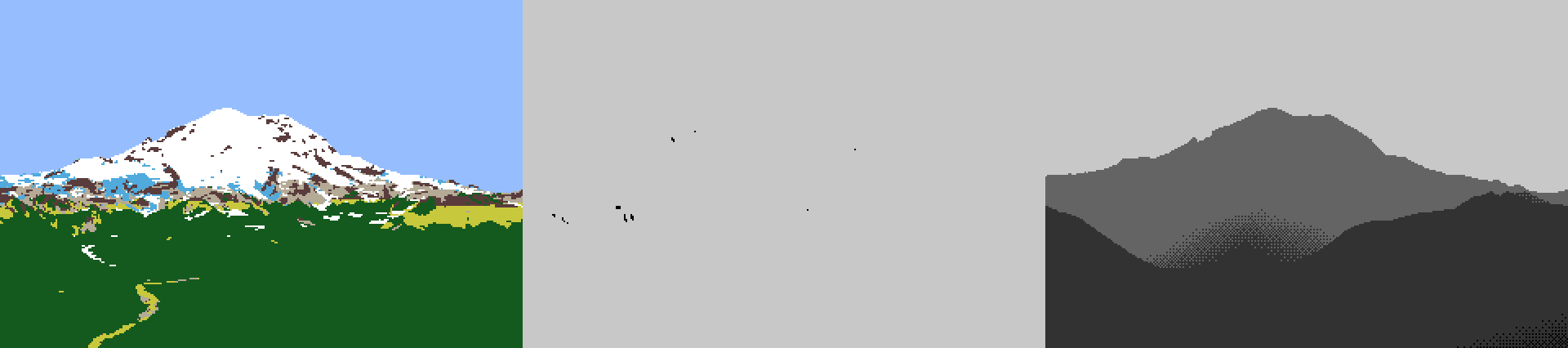
Material, family (white = lit), haze band. The middle panel is the problem I spent the next hour on without knowing it: at noon in July, with the sun at 64°, almost every pixel is lit. n·l alone has nothing to say.
The most useful instrument of the day was dbg_matL.py: under each material I painted, the photo's L* distribution next to mine.
forest  n=26319 photo L [10.2 14.5 21.9] | mine L 25.1
meadow  n= 1526 photo L [16.4 28.1 45.4] | mine L 47.0
scree   n= 1574 photo L [39.2 54.5 66.1] | mine L 63.8
My albedos were guesses. This turned each into a measurement: forest albedo went from 0.035 to 0.0055, and later to 0.0045 with a bluer tint. It was the same "measure the photo under your own mask" idea as section 9, turned on my own output.
Then came haze, and three dead ends in a row:
- v7: dithered band seams (063). I dithered each haze-band edge over 6% of its distance, like the aerial student. On a valley floor it made a smoky checker field. This was exactly the aerial student's warning, and I walked into it anyway.
- v8: per-column ridge layers (064). Walk each column top-down and keep one band per occlusion layer. It made vertical streaks wherever a column crossed a ridge differently from its neighbour.
- v9: quantize the haze path, then a 5×5 majority filter (065). Clean flat haze shapes. The near ridge now separated dark against the bluer valley, as in the photo. But the shapes were big blobs with large value jumps.
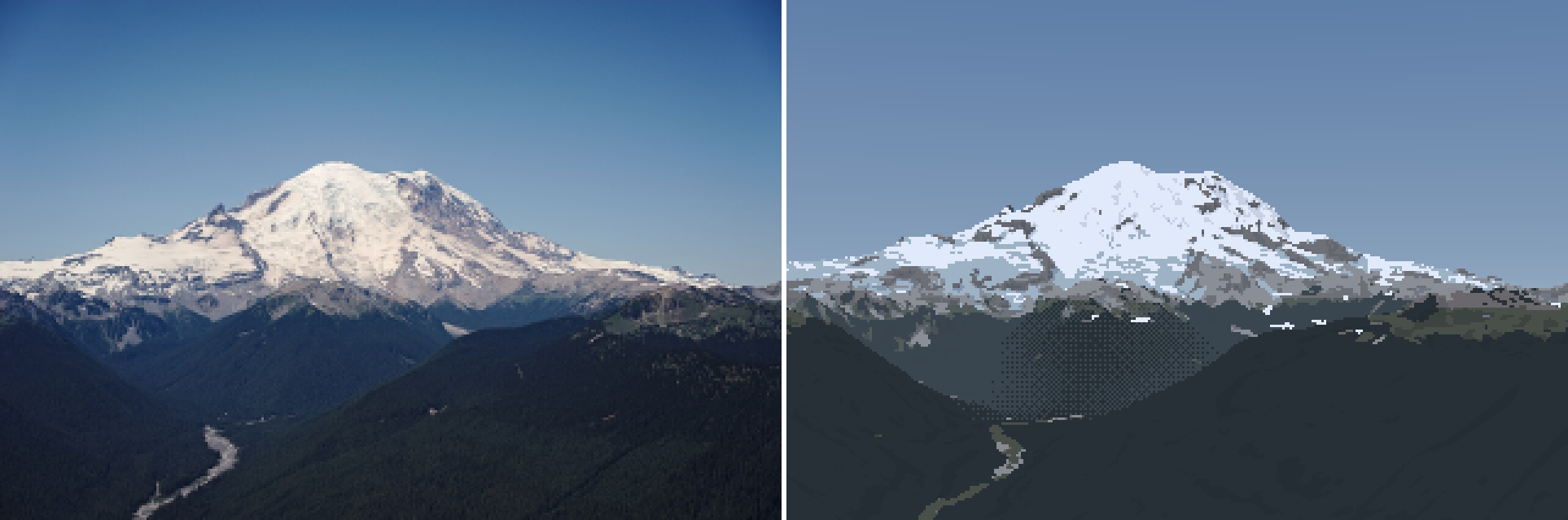
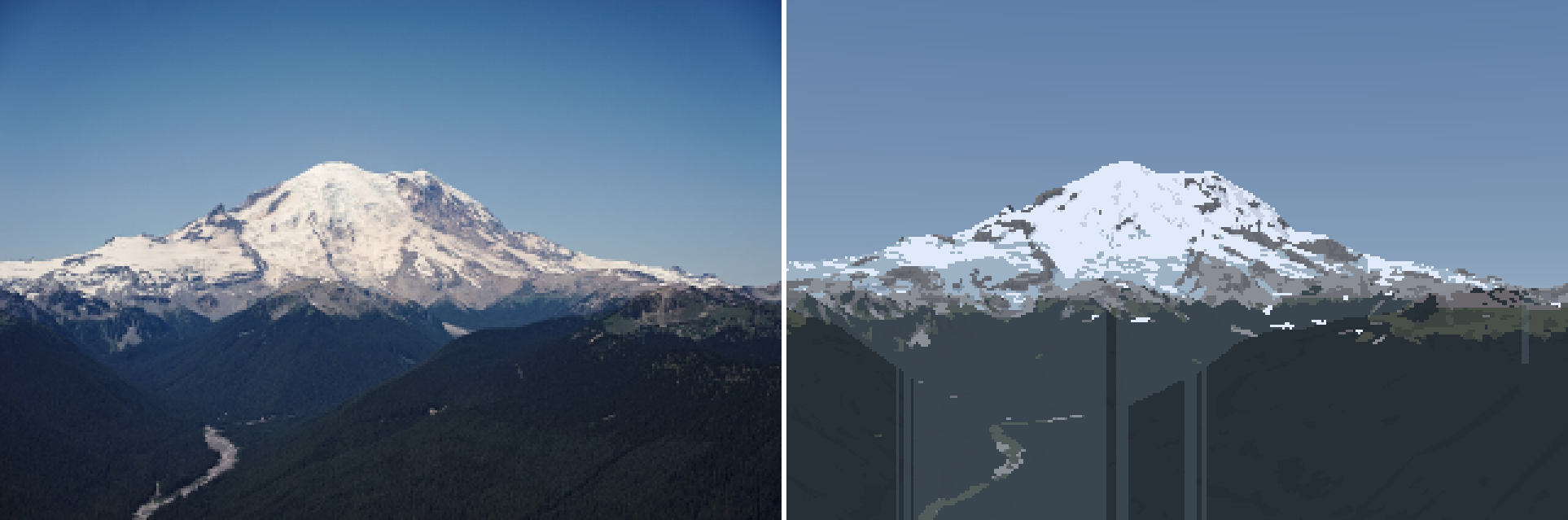
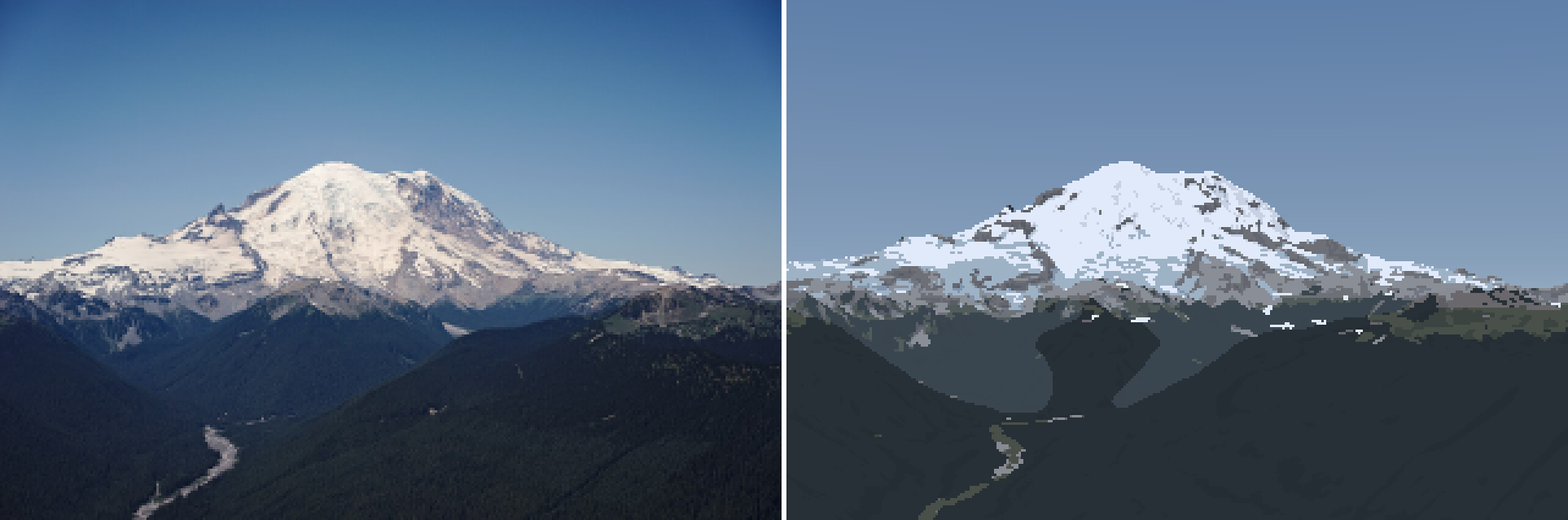
v7, v8 and v9. The dither smoke, the column streaks, and the first clean version.
A critic sub-agent looked at the pair here. I wrote the findings into the notebook and kept going. v10–v11 replaced the coarse bands with eleven fine bands (0.6 to 45 km of haze path) and a 3×3 majority. Each seam became a small value step, a gentle contour, instead of a hard shape (069):
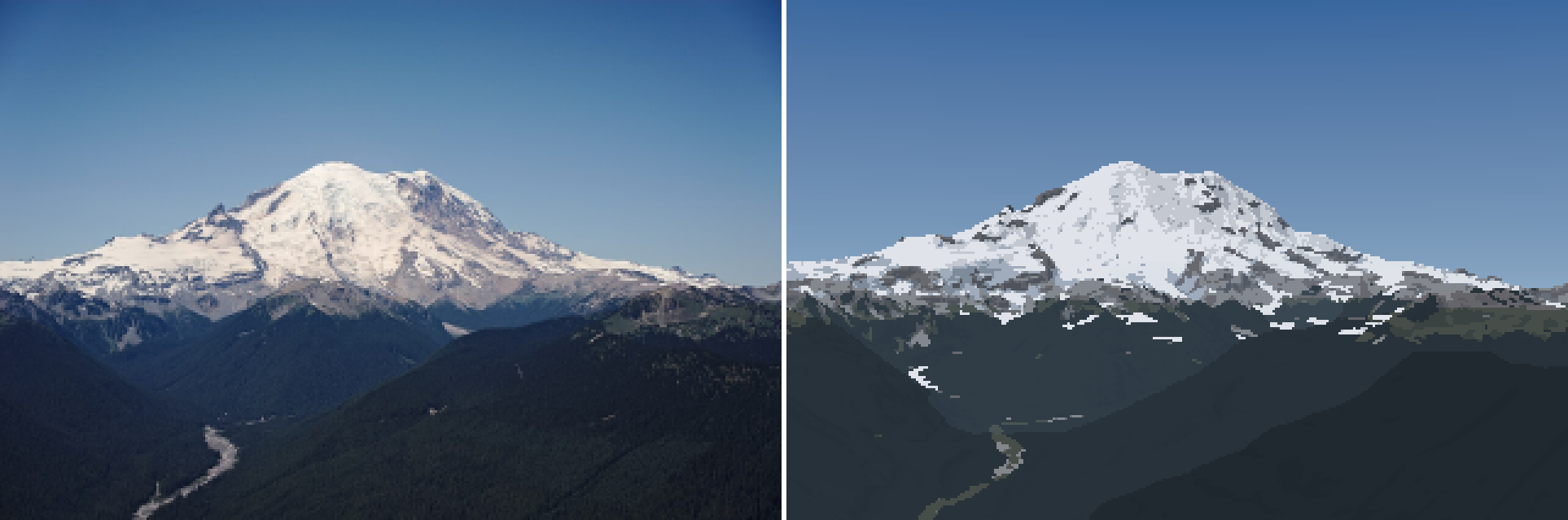
v11. The valley now reads as a gradient of flat bands. Note the white hook in the forest at lower left: snow the model left in a shaded valley bottom. It survived for a long time (section 13).
The dashes. The snow edge was still a string of one-pixel dashes. I dumped the index canvas around one of them (dbg_px.py) and saw a single row of snow pixels, 10 long, on forest. My sliver filter measured rows spanned, and this dash spanned 1 row, but my threshold only killed components under a minimum area. I changed it to mean thickness (area ÷ columns) under 1.5 px, removed unless the dash is a long ledge. That was v12 (070).
v13: fall-line smoothing (071). This was the right fix for the snow shapes. Snow patches and rock ribs are elongated down the slope (Imhof's Figure 170). So before thresholding the cover, I average it along the screen-space fall line, a small line-integral convolution:
def fall_smooth(a, fall, L, valid, n=None):
    """average a along the screen-space fall line over +-L px: snow tongues and rock ribs
    stretch down the slope, as gullies and ribs do (Imhof fig. 170)"""
    for sgn in (1, -1):
        x, y = xx.copy(), yy.copy()
        for i in range(n):
            fx, fy = fall[iy, ix, 0], fall[iy, ix, 1]          # screen direction of steepest descent
            x += sgn * fx * L / n; y += sgn * fy * L / n
            w = valid[iy, ix] * (1 - i / n)
            acc += a[iy, ix] * w; wsum += w
    return acc / wsum
render.add_fall_line computes fall by projecting a short step down the terrain's steepest descent into the image.

v13, crop. Snow tongues run down the slope instead of lying as dashes across it.
11. The haze finding
Here is the measurement I promised. The Koschmieder fit for the clear 94 km photo gives a visual range of about 80 km: forest at 60–70 km is roughly half lost. But the forest 5–8 km below the Silver Queen camera is almost unhazed: L* 14.6 against ~12 intrinsic. At an 80 km visual range it should have been ~22 (mine was 22.6). No single haze distance fits both photos.
The reason is that the Silver Queen camera stands at 2,129 m, and haze is mostly low: aerosol density falls with height, with a scale height of 1.5–2.5 km (the boundary layer). So a ray's haze is not its length. It's the length weighted by the air density along it. For density ∝ exp(−h/H_a), a straight ray from camera height h_c to target height h_t crosses this much sea-level-equivalent haze:
def eff_dist(dist, hc, ht, Ha=1500.0):
    """sea-level-equivalent haze path (m): aerosol density falls as exp(-h / Ha), so a ray from hc
    to ht crosses dist * mean(exp(-h/Ha)) of sea-level haze.  This is why summits stand clear
    above hazy foothills."""
    dh = ht - hc
    small = np.abs(dh) < 1.0
    mean = np.where(small, np.exp(-hc / Ha),
                    Ha * (np.exp(-hc / Ha) - np.exp(-ht / Ha)) / np.where(small, 1.0, dh))
    return dist * mean
That one change put the painted forest at the photo's value (22.6 → 14.7; photo 14.6). It is also the physical reason for Imhof's rule and for every Ferrari mountain: the summit stands clear because the air up there is thin, while the foothills sit in the soup. The haze bands are now quantized in this path, not in metres.
12. Looking closely: the snow model was wrong
I upscaled the photo's own 320 px crop to look at it the way it would be painted (072):
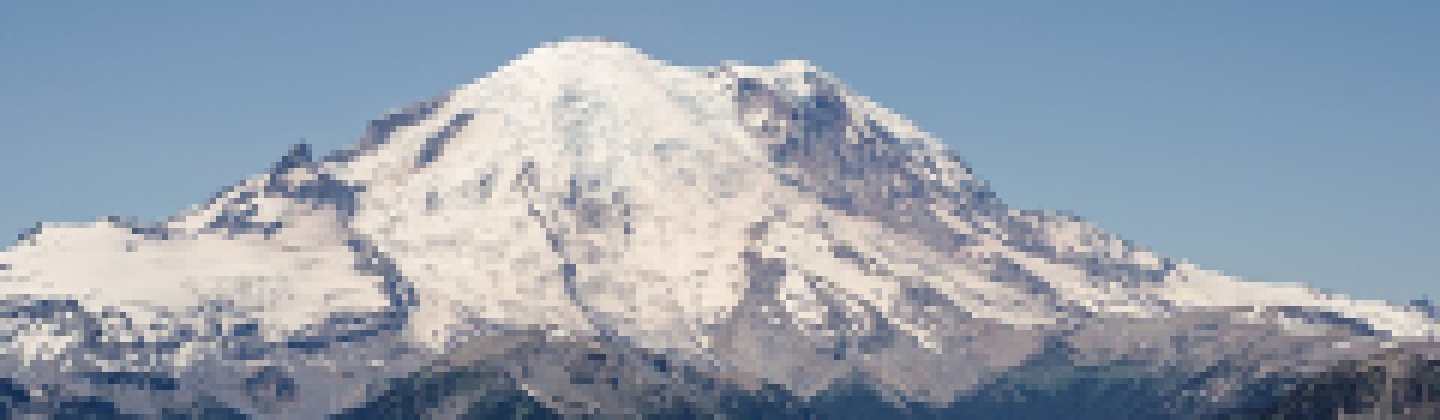
The photo at my pixel size. The steep walls under the summit (Willis Wall side, right) are dark rock with thin white threads. The white is on the gentle glacier surfaces and in the channels.
Then I rendered the model's snow cover at high resolution under the photo (073):
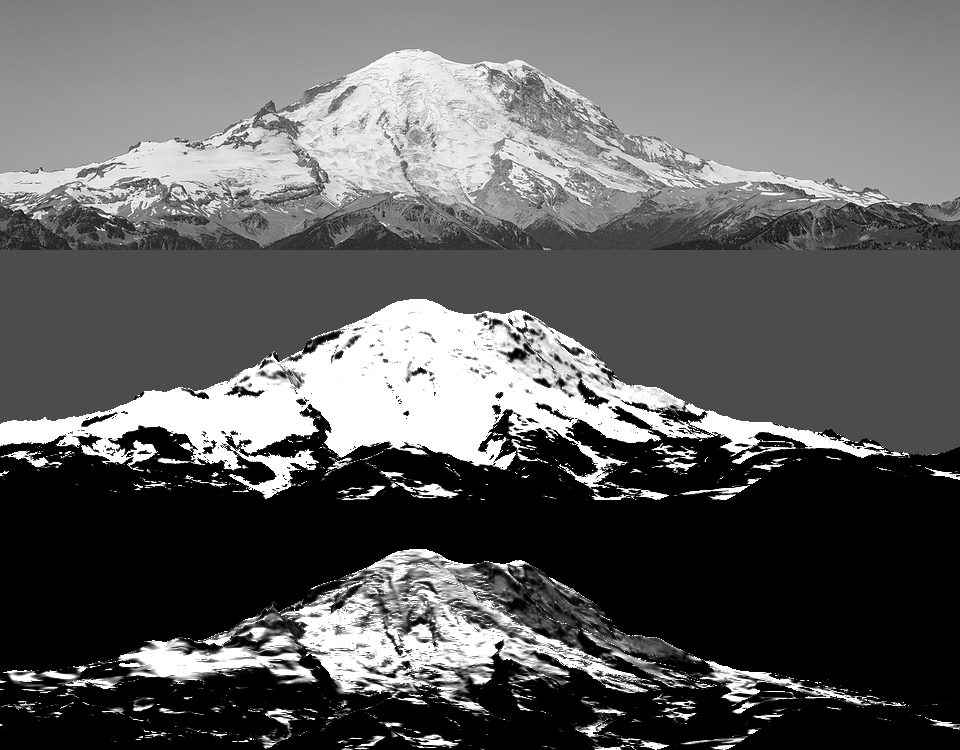
Top to bottom: the photo in grey, the model's cover, the model's depth. With the Bernhardt & Schulz holding depth, the steep walls hold 0.45 m of snow at 60° and stay white. The photo says they're bare.
This was section 3's choice, now made by a photo: the steeper OGGM law. One line of parameters (074):
# holding depth: Bernhardt & Schulz defaults (3.08/1.11/0.45 m at 30/45/60 deg) fit
# c=23, a=0.067; OGGM Snowslide's defaults are c=145, a=0.14 (2.2/0.27/0.03 m).
# Summer photos of Rainier's steep walls (bare above ~45 deg) match the OGGM set.
shd_c=145.0, shd_a=0.14, shd_min=0.05,
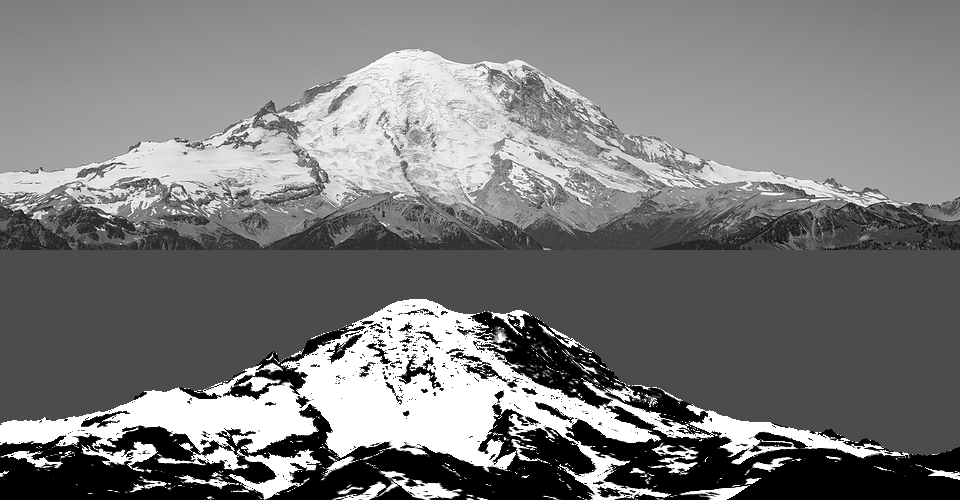
After: the walls under the summit are dark with white threads, like the photo. The model now keeps the Willis Wall bare.
I also let steep faces inside the glacier mask be rock (ice_max_slope, 42°): WorldCover calls the Willis Wall "ice", but it's a rock face with hanging ice. v14 and v15 followed (075, 076), with the snow's lit ramp compressed to a plateau (the photos show lit snow as nearly one value).
13. More peaks: Stuart, and the gullies
A single answer key can be overfitted, so I fitted two more photos (080): Mount Stuart from the south at 5.6 km (July 2008), and Glacier Peak from the east at 12 km (August 2003).
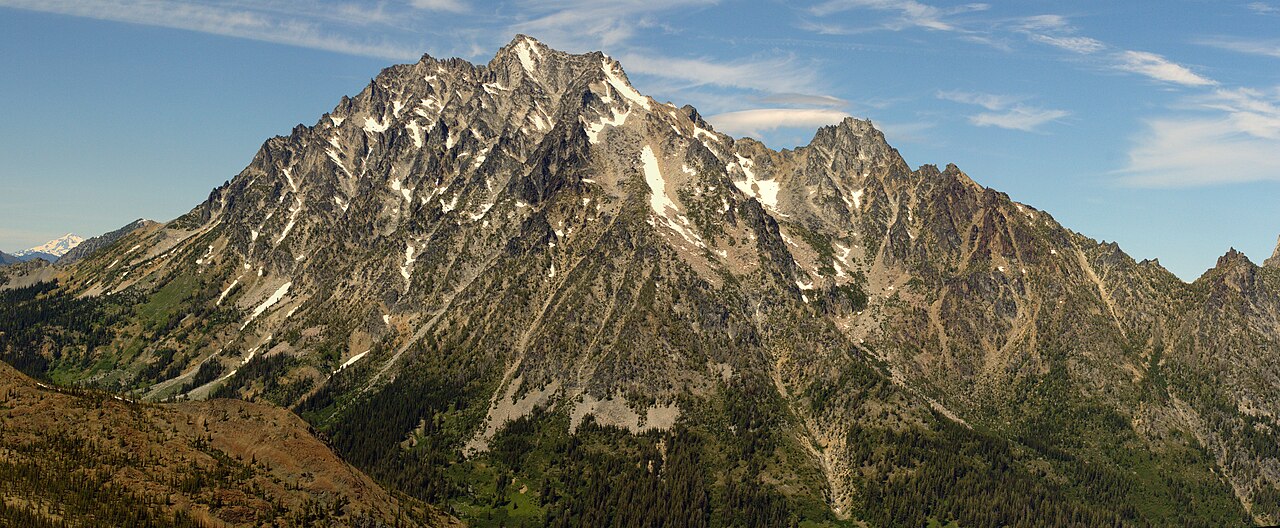
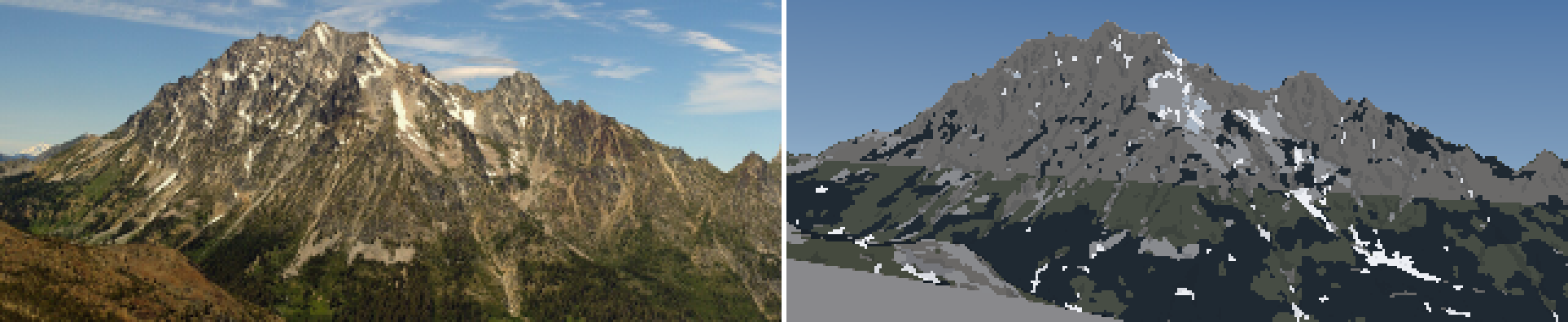
The Stuart answer key (078): warm gold-grey granite, a hundred gullies, and white threads of snow in the couloirs. This photo is Imhof's Figure 170 in life.
Both fitted excellently on the first try with the control point.
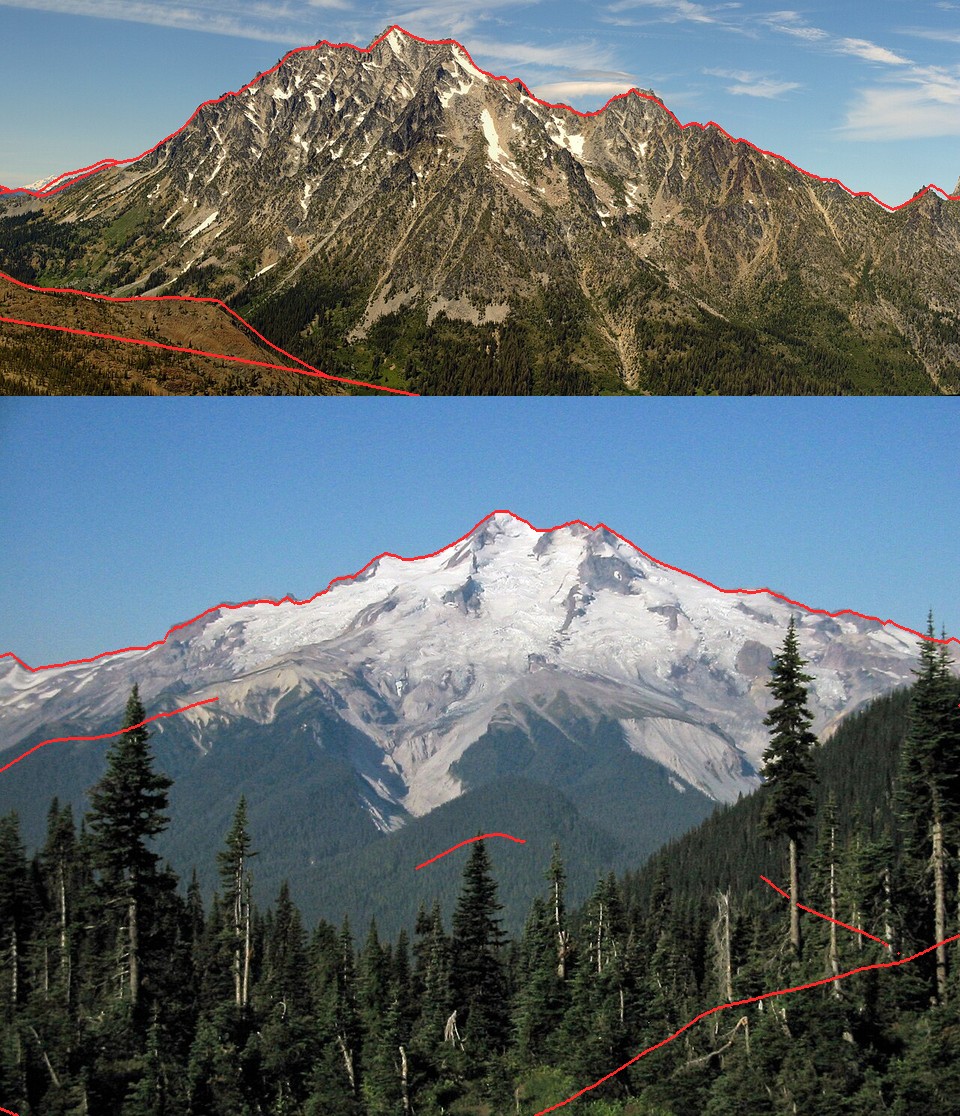
Stuart (top) and Glacier Peak (bottom). Every major edge lines up, including Stuart's foreground ridges.
Stuart's first paintings were grey and snowless (081):
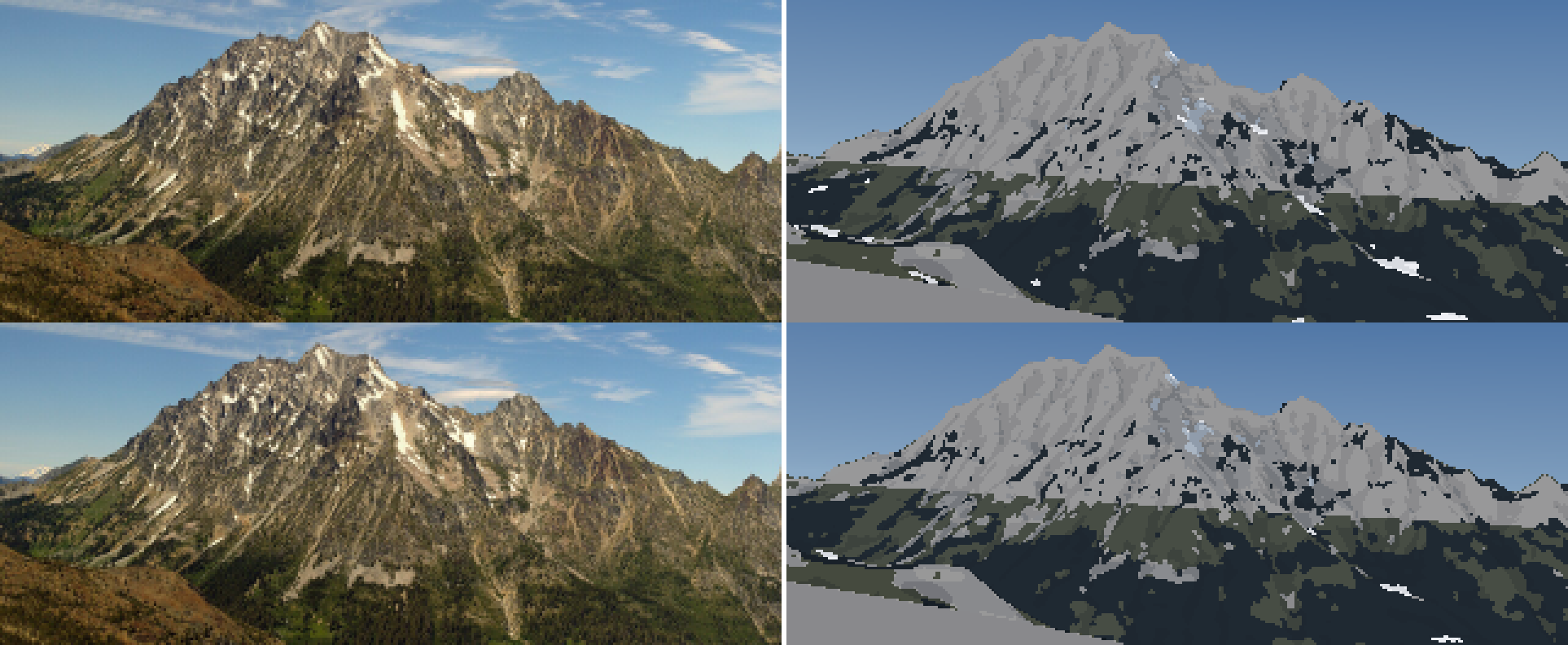
Stuart at snowlines 1,900 and 2,200 m. The rock is a flat mid-grey and the snow is almost gone. At 10 m the DEM smooths every gully of this granite wall away.
Lidar. Stuart's gullies are a few tens of metres wide, and the 10 m DEM had rounded them away. USGS publishes 1 m lidar as cloud-optimized GeoTIFFs with overviews, so I read it remotely: rasterio over /vsicurl/, resampled to 4 m, with no tile download (the four Stuart tiles total ~900 MB). A 4×4 km box took 23 s. The ray caster got a two-level version: the fine grid overrides the coarse one where it exists (083).
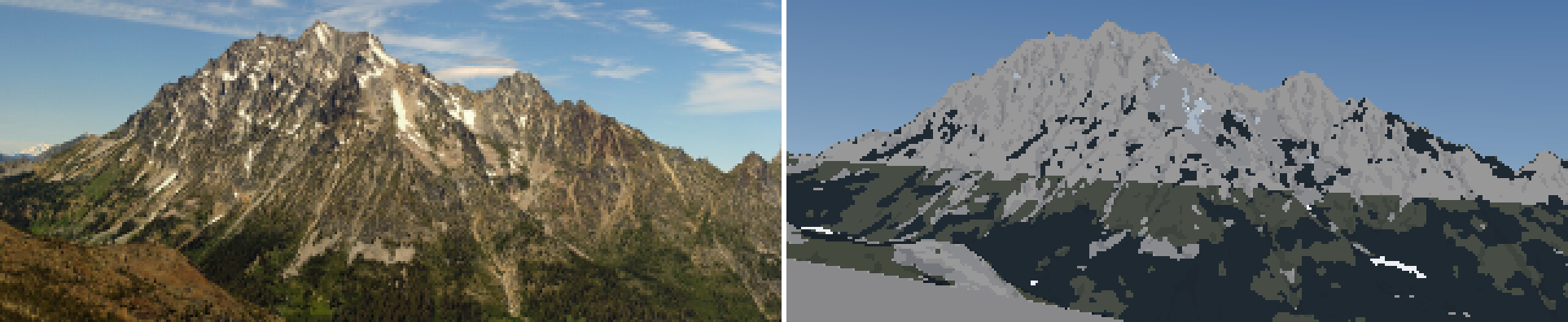
With lidar the ridges and spurs sharpen, but the snow is still almost gone, and the lower frame is a flat grey slab.
Still, the snow barely existed: 1.4% of the terrain against the photo's white threads everywhere (084). I rendered the cover under the photo and saw two bugs at once:
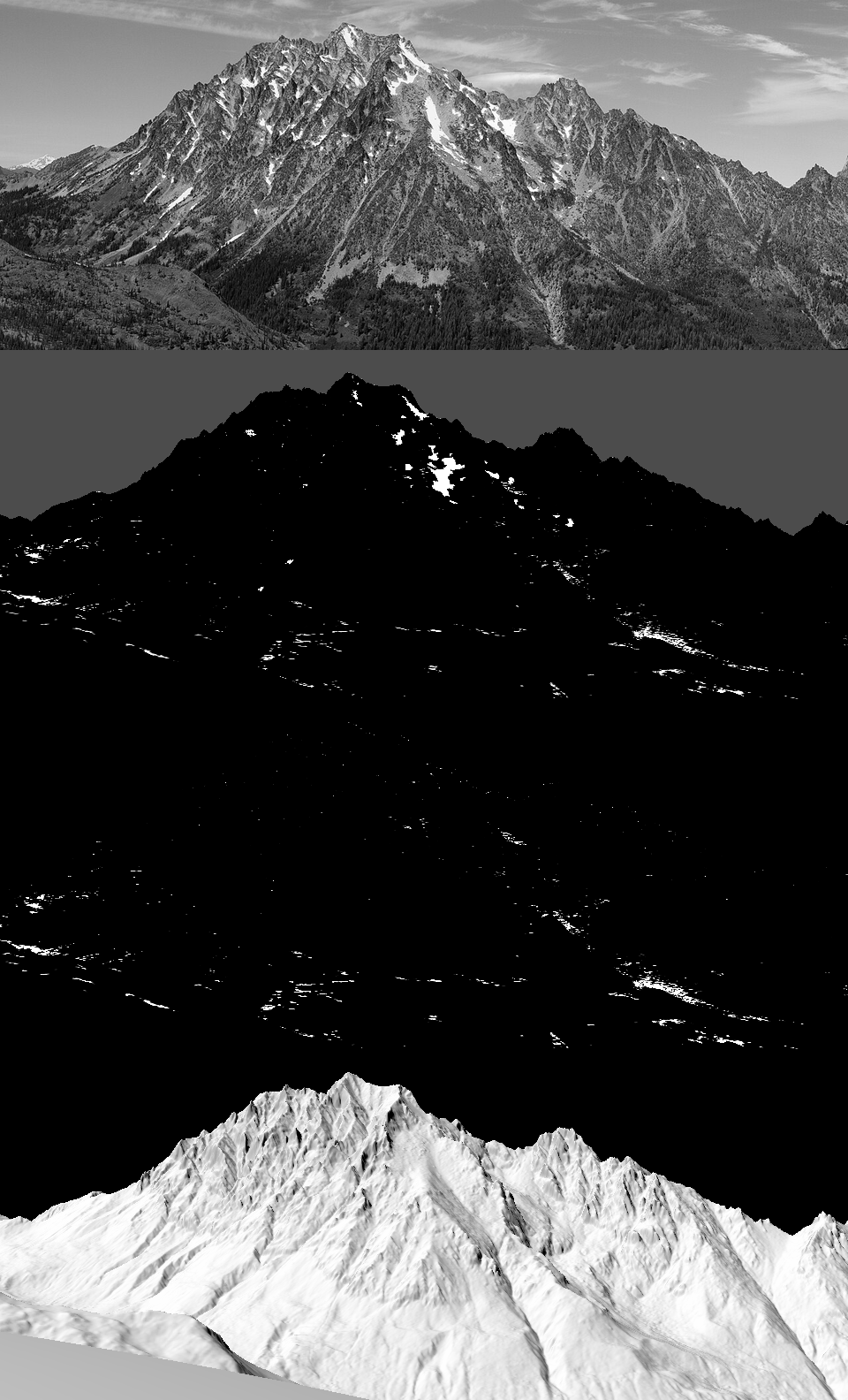
Photo, cover, depth, n·l. With lidar the model sheds all the snow off the steep granite, except a scatter of horizontal slivers. The depth panel said something else too: max 14,765 m.
The 14 km of snow was a lidar pit. The routing kept everything that reached a closed depression, and lidar is full of tiny pits (noise, boulders, trees). Pits now fill to 15 m and the rest is lost, and deposits are capped at 14 m (real avalanche cones are 5–15 m deep).
The missing snow in the gullies was physics I hadn't put in. A couloir holds more snow than an open slope of the same angle, because the snow is wedged between walls. Imhof's drawing and every summer photo say the same. I multiplied the holding depth by the local concavity:
# couloirs: snow wedged between walls is held by side friction, so a channel holds more than an
# open slope of the same angle (and steep rough rock holds snow on ledges: Haberkorn 2017)
cg = curvature(Z, res, P["gully_r"])                     # height minus local mean over 25 m
gully = np.clip(-cg / P["gully_depth"], 0, 1)            # 4 m deep = full gully
shd = shd * (1 + P["k_gully"] * gully)
(085):
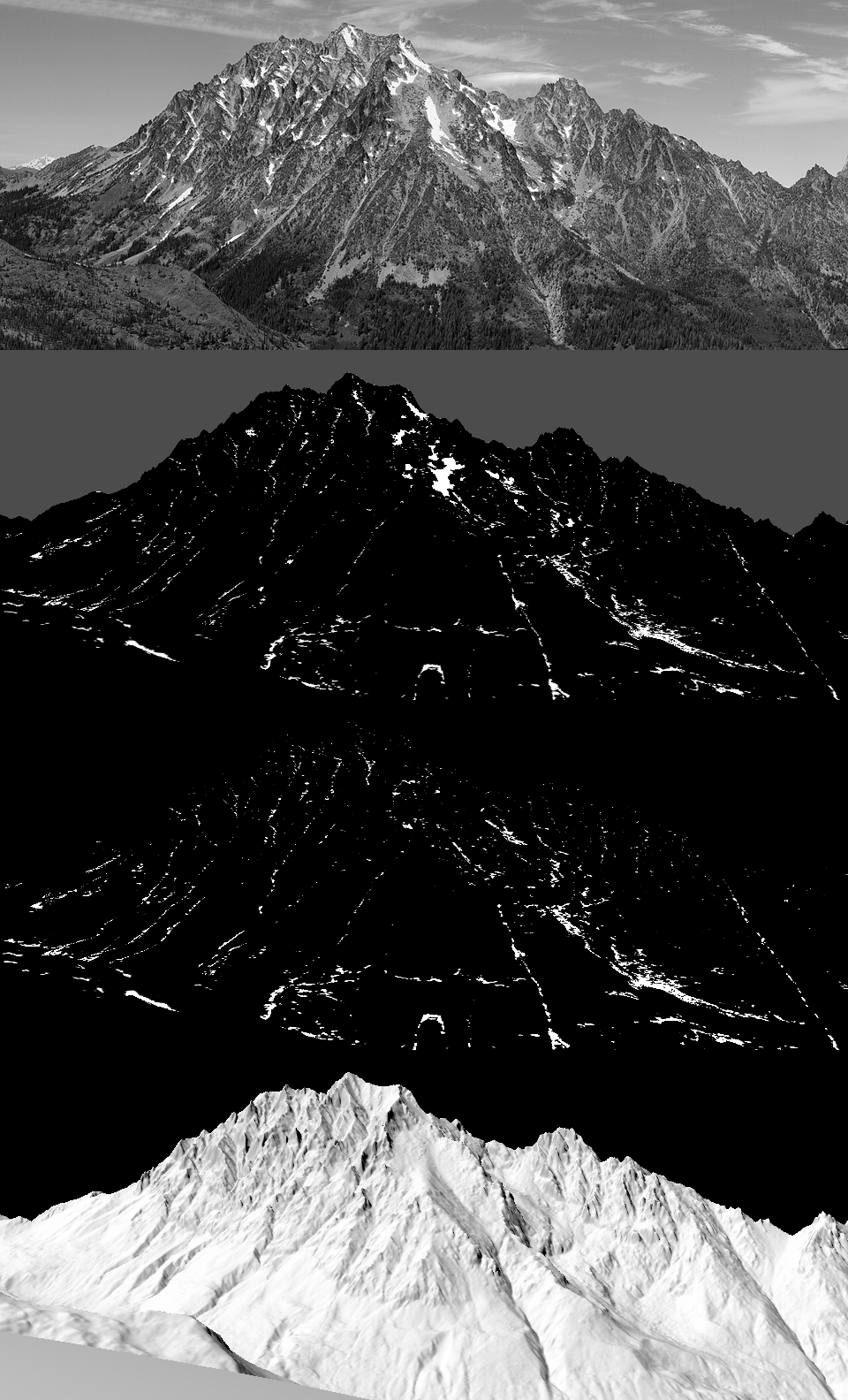
With gully support: the snow sits in the channels and on the Stuart Glacier bench, as white threads. The central couloir in the photo (the big white stroke right of centre) is there.
Then the rock. My granite was a flat light grey (g1, g2), because the photo's gold-grey is lichen-darkened granite, and dbg_matL said the photo's lit rock was L* 43 where mine was 63. I set granite's albedo to 0.15 (g2).
 But the wall still read as one flat plane. Three things fixed that, one at a time, each visible in the crops:
- g3: the sub-pixel shade fraction (088). I had been averaging normals over each pixel's 3×3 supersamples before deciding lit or shade, which erased every rib narrower than a pixel. Now a pixel is shade when more than half its supersamples face away from the sun or sit in cast shadow, and the fraction also pulls lit pixels down a step.
- g4: local relief (089): n·l minus its own neighbourhood mean. This is Imhof's "local adjustment of the light", which puts forms in even where the true sun is flat on the face. But it scattered blue-grey specks over the wall (the relief pushed isolated pixels across a family boundary), so
dbg_fields.pycame next (091).

g4: the local relief term adds form, and scatters specks across the family boundary.
- g6: quantile keying (092). The debug fields showed the real problem: the n·l field is full of structure, but at high noon its whole range is tiny, so an absolute ramp puts 90% of the wall on one step. I blended the absolute coordinate with a rank-keyed one: each material's lit pixels are sorted by (n·l + relief − sub-pixel shade), and the steps take fixed shares (rock lit 30/40/30%). This is the ground student's "key each family by its own quantiles" and the rock student's "value economy taken from the photo".
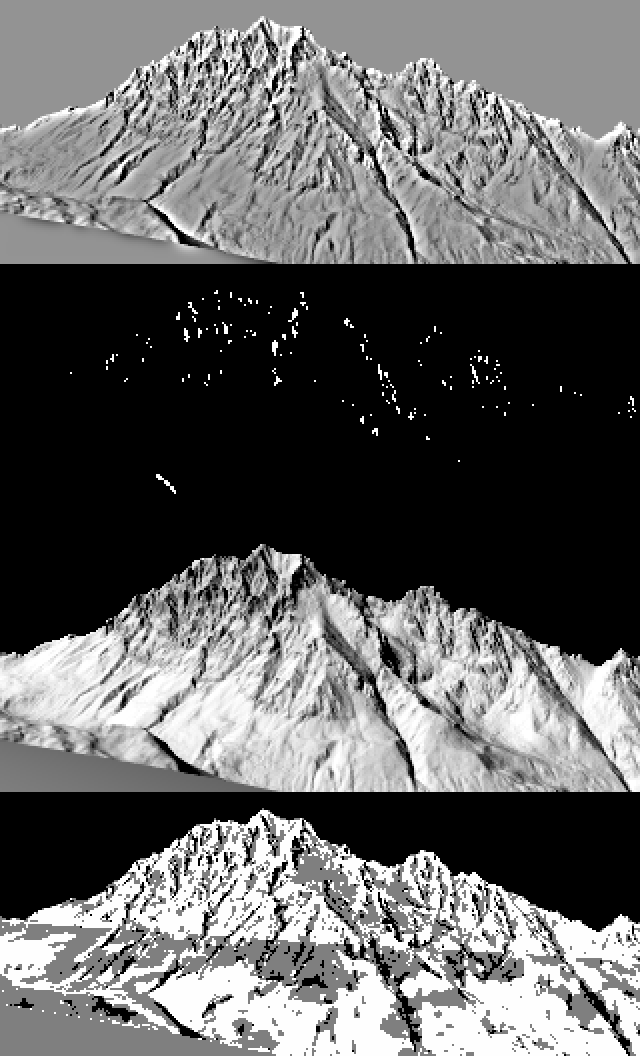
Relief, sub-pixel shade fraction, n·l, and the resulting step. The relief field (top) is beautiful, like one of Imhof's shaded reliefs. The step field (bottom) is nearly all one value: that's why the wall read flat.

Stuart g6. The face now has structure at the right scale and the snow sits in the right couloirs. It's a grey value texture, though, not the photo's warm gold rock with sharp dark structural lines. I never got the rock to draw the way Imhof draws it.
14. Glacier Peak, and a DEM that was all zeros
The Olympus fit came out absurd: camera height 2 m, a wild pitch. The DEM box was all zeros. The local 1/3" tiles had disappeared from ~/work/voxsim-data/dem10/ during the afternoon (a disk clean-up outside my study: free space went from 5 to 43 GB), and my mosaic code silently filled missing tiles with 0. I added a remote fallback (the same USGS tiles as COGs over HTTP) and a guard that raises if a mosaic comes back empty. The Olympus fit still failed after that (093): it locked onto the wrong ridge line, and I suspect my summit-pixel guess was not Olympus at all.
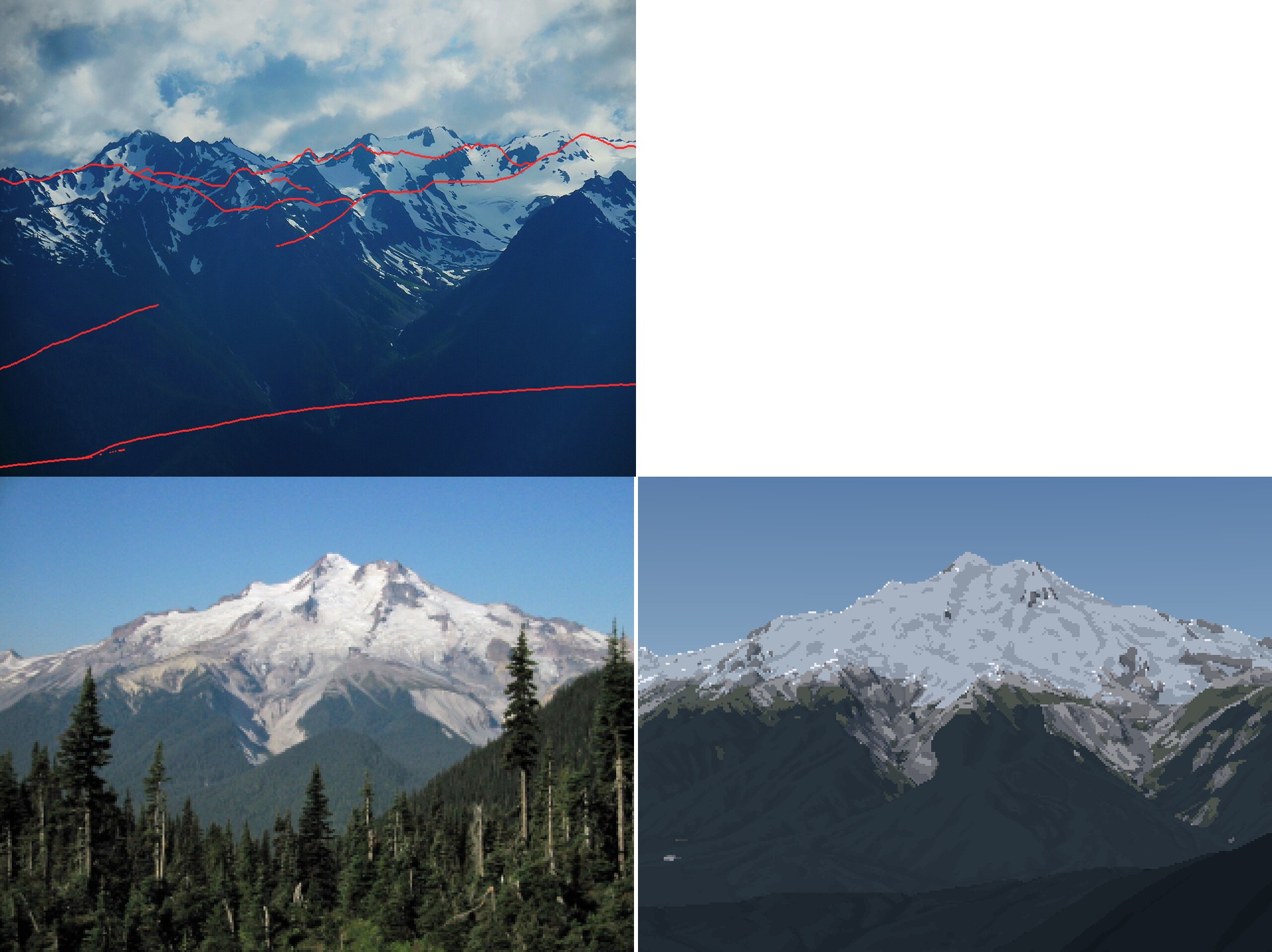
Top: the Olympus fit, locked onto the wrong ridges. Bottom: Glacier Peak a1, the right silhouette with dark, cold snow.
Glacier Peak rendered (a1, a2 in (094)) with the right silhouette, but its snow keying was too dark, and all its glacier ice was grey. Two fixes:
- Firn stays on glaciers. The gravity routing shed snow from 30° glacier surfaces too, so everything turned to bare ice. But a glacier is retained snow. On mapped ice below 35° the model now keeps the wind-redistributed depth, and the firn line falls near the ELA: white above, grey below.
- Then Glacier Peak's snow disappeared entirely (a4, (096)). The DEM for its snow box had been cached while the tiles were missing: all zeros.
max(Z) = 0. I cleared it; the guard now catches it.
After that, two more photo-forced corrections. Deep avalanche cones stayed white all August in shaded valley bottoms, as bright blobs in the forest (a5, (097)). Real low snow melts from warm air whatever its aspect, so the melt is now half air temperature and half sun:
wT = Pd.get("w_temp", 0.5)
melt = acc_sl * np.clip(1 + Pd["k_melt"] * (z_sl - Z) / 1000, 0.05, None) * \
    (wT + (1 - wT) * np.clip(I, 0.05, None) ** Pd["p_ins"])
And forest canopy hides any snow on the ground under it from far away. Per-peak rock albedos went in too: pale dacite at Glacier Peak (0.27), darker andesite at Rainier. That was a6 (098), the pair at the top of this page.
15. Sheets: distance, season, light
The brief asked for 5, 20 and 80 km. src/sheets.py builds synthetic views: stand on the real bearing of a real vantage (Seattle for Rainier, Longs Pass for Stuart, Hurricane Ridge for Olympus, Colchuck Lake for Dragontail), dist km out, and look at the summit. Rows are distance × season (September minimum, late May), columns are four lights (clear noon, clear evening, hazy afternoon at an 18 km visual range, alpenglow).
The first Stuart sheet (099) had a blank 20 km row: a knoll right in front of the camera filled the frame with one flat colour. A visibility check (is the ray to the summit clear?) made it worse (100): the camera now stood where it could see the summit over a huge near slope.
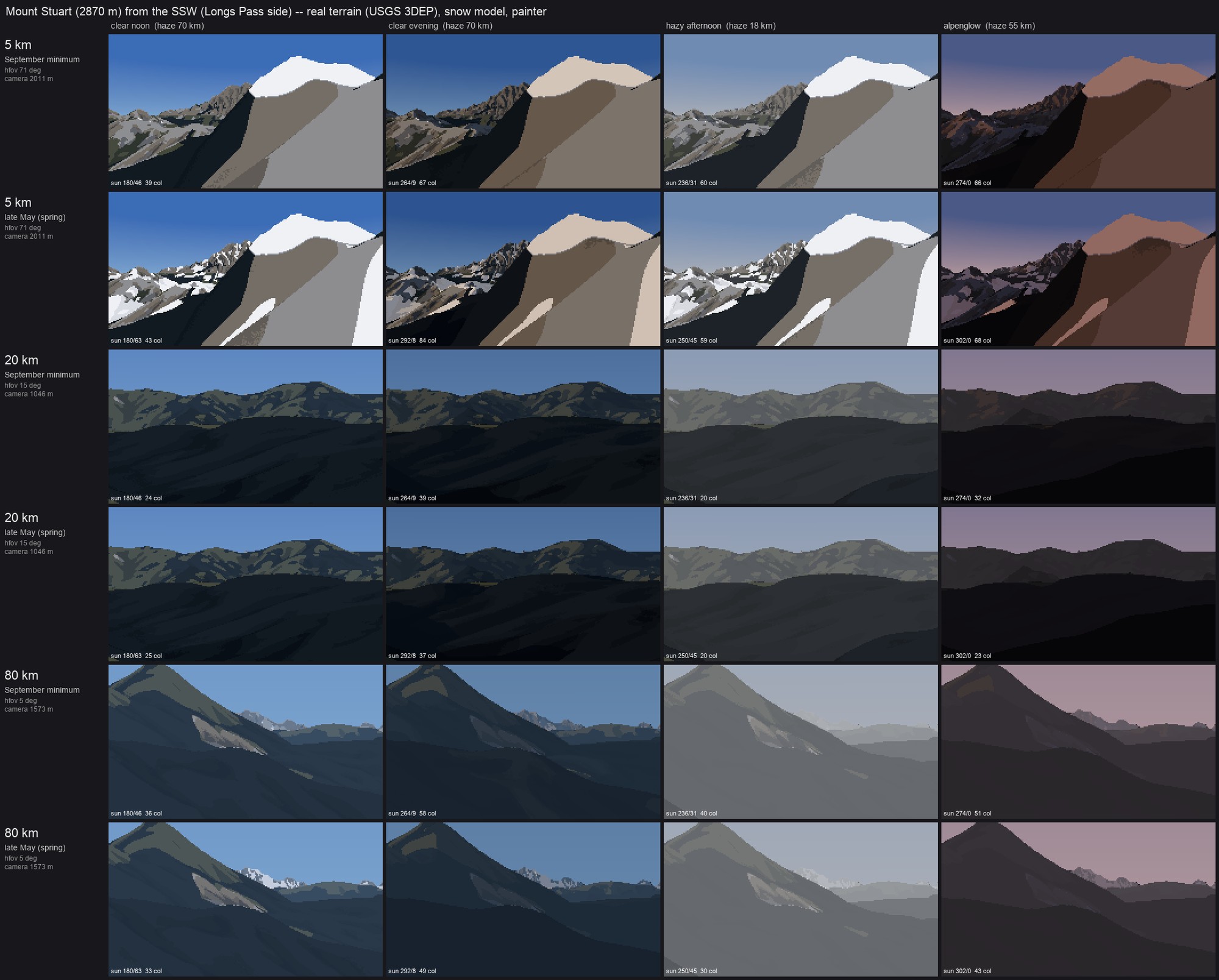
The second try. The camera sees the summit, but a near slope fills the 5 km frame and the 80 km frame is just a hill. Visible is not the same as a view.
The fix was a photographer's rule: the foreground must fall away. A ray aimed 0.35 of the frame below the summit must travel at least 30% of the distance before hitting ground. I also searched sideways, off the bearing, when nothing on it worked. With both rules, the 20 km row found a view (103):
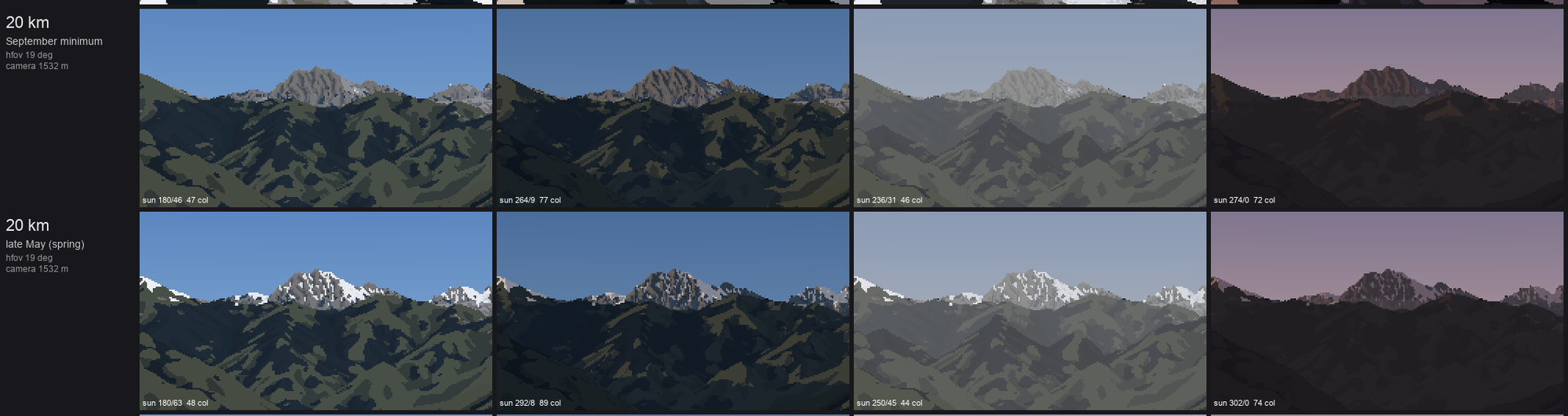
Stuart at 20 km, September and late May, four lights. The granite peak stands over darker forested ridges. The May row shows broken snow cover on the ridges and the peak.
The Rainier sheet's 20 and 80 km rows read best of all (104). The Olympus 80 km row is broken: the camera is 3 m above sea level on the Strait shore and the peak sits in the horizon haze (106). The Dragontail 20 km rows show the best snow pattern of the whole set, with gully threads in September and broken cover in May (107).
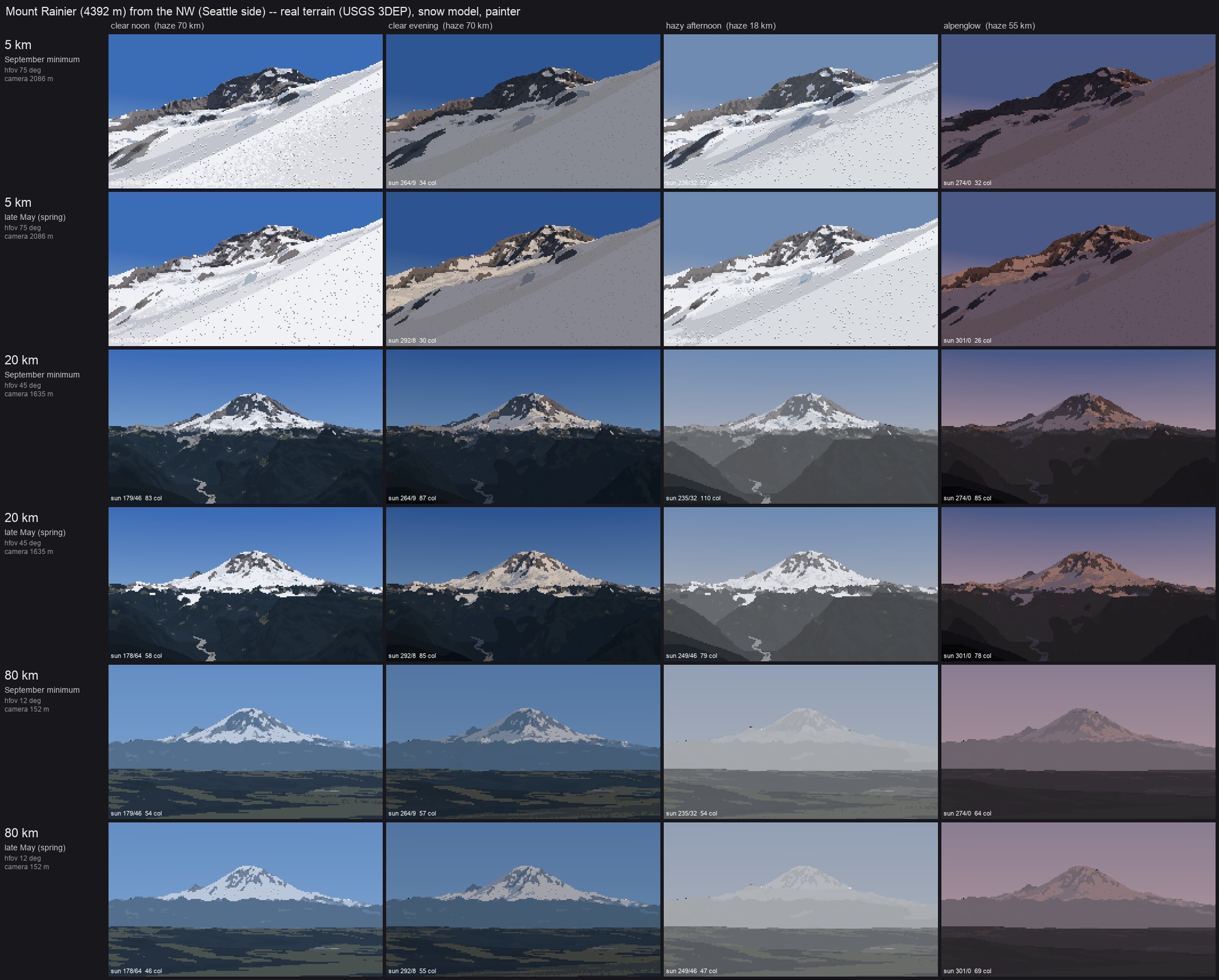
Rainier: 5 km (the standpoint landed on the glacier itself), 20 km and 80 km. At 80 km the peak is a pale shape over the darkest band of foothills, as measured in section 9.
Last came the close vocabulary: gully fill, ledge bands, a cornice and a glacier edge, on small synthetic terrains through the same model and painter. The first sheet came out entirely sky (105).

Eight cells of pure sky: a useful reminder that a ray caster stops at the edge of its world.
The cameras stood outside the synthetic grid, and the ray caster stops at the grid edge. After padding the grids and lifting them to 2,450 m, the cornice and glacier rows read (109): windward scour against lee load with a lit crest lip, and a white firn tongue between moraine ridges with crevasse arcs where it steepens. The gully and ledge rows didn't: the curvature scales are in metres, not metres per pixel.
16. What the critics said, and where it stands
Two critic sub-agents looked cold at the pairs and the sheets. Their most important point was one I agree with: the terrain below the snow has no ridge-plane value structure. At Glacier Peak it's one blue-black slab where the photo has four receding green planes and a lit ridge. At Rainier the forest is faceted dark polygons with no haze gradient. At Stuart 20 km it's camouflage. The fix they named is the aerial student's and Ferrari's: one value per ridge layer, lighter and bluer with distance, warm on sunlit slopes. I didn't get to it.
They also found:
- false snow blobs in Rainier's upper forest (v16 was rendered before the canopy fix);
- a horizontal seam across the Stuart sheet that I haven't chased;
- lit snow that's cold where the photos show warm white (b* +2 to +11);
- no structural strokes in the rock.
So, plainly: the form half works. Every picture is the real mountain, from the photographer's real place, and the snow is in the real places for published reasons. The surface half isn't at the bar. The rock, the forest and the snow's warmth are all behind the photos. The tutorial teaches the half that works, from the code that made it, and says at each step where it falls short.