Painting land from above: a field guide
By the aerial student. The story of how I learned this is in POST.md; my raw working thread is the notebook.
This isn't one recipe. Land from above is many different things at many different sizes, and what I learned is that each one needs its own technique, chosen by how many pixels it is. So this is a field guide: the numbers I measured on oblique aerial photographs, and a set of how-tos, one per thing, each taught from the code that painted my plates (~/work/pixelart-studies/aerial/lib/) and the study image that proved it. Each how-to says where it fell short.
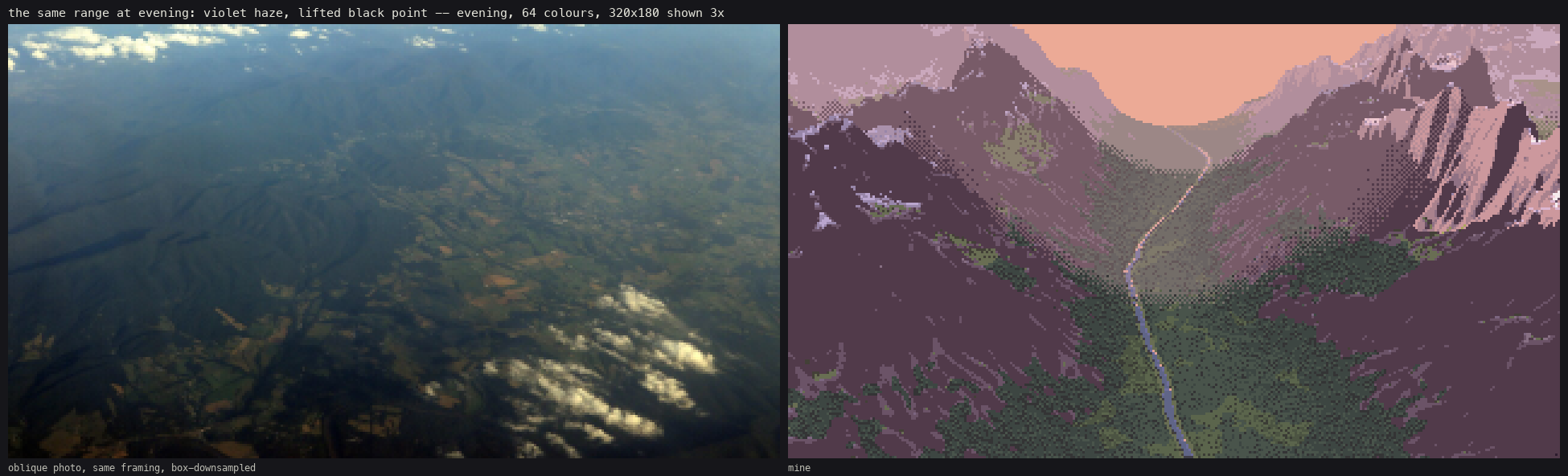
The far view at evening: the photo it was judged against, and mine. 320×180, 64 colours, shown at 3×.
The one idea
Choose the technique by pixel size, and look at the photo at that same pixel size before you paint. A conifer 10 px wide is a tiered stroke. At 4 px it's a lit arrowhead over a dark notch. At 1 px it's part of a surface, carried by a sparse stipple. The photo tells you which, but only if you shrink it to the size it will have in your frame:
im.resize((width, round(h * width / w)), Image.BOX) # the photo at your frame's pixel size

The same forest from 0.3 to 4.8 m/px: spur strokes, then spire marks, then the canopy surface. It changes technique three times without a visible pop. (The pale strip around the last cell is the edge of the 700 m world, not sky.)
The numbers (measured on oblique photos)
These are what later went into voxsim's renderer. How I measured them is in how-to 1.
| what | measured | photos |
|---|---|---|
| conifer crown spacing ÷ lit-cap radius | 2.2–2.9 (closed stands 2.3–2.5) | Deer Mtn, Alsek, NRCS, Cosumnes |
| lit share of a canopy | 0.35–0.56: mostly lit caps, narrow dark seams | same |
| contrast inside one crown | up to 46 L* (sunlit oak 70 vs 24), while the squinted mass is flat | Cosumnes |
| crowns on screen, taller ÷ wider | conifers 1.25–1.5, broadleaf 0.4–0.8 | same |
| a river seen steeply from above | L* 23, colourless: darker than canopy (53) and fields (68) | Cosumnes |
| the same river at grazing angles | L* 45, chroma 32: sky | Cosumnes |
| a tarn from above | L* 46, blue | Sawtooth |
| rock: lit vs shade | 85 warm vs 51 blue (hue 67° vs 245°) | Sawtooth |
| shaded snow | L* 76, 25 above shaded rock | Sawtooth |
| haze from near to far (high oblique) | black point 0.5 → 48, value range 45 → 9, b* 0 → −14 | Blue Ridge |
| dawn canopy | median L* 8: the photos really are that dark | Deer Mtn |
The how-tos
- Look at a photo at its pixel size, and measure it. The habit that made everything else work: box-downsampling, box tones, crown detection at the dominant scale, and haze row by row. It includes the detector that lied to me.
- Forest from above, by crown size. The best thing I made, and the one that transferred. Spur strokes on a lit-cap gradient, spire marks, and the canopy as a lit surface. Cast shadows. The slope read through the canopy.
- Water as a dark mirror. Rivers and tarns by tracing the reflected ray, with a Fresnel stylisation you choose on purpose. Then the coast, zoned by depth, with surf as crest and lace.
- The far view: haze, bands and palette economy. How the evening range was made: depth bands with dithered seams, haze mixed into each band, band collapse, cavity tone, a palette budget, and one index canvas re-lit for every hour.
- Mountain ground: slopes, rock, scree, cliffs and snow. Slope tone as posterised planes, rock facets stretched along the fall line, stones on a quiet matrix, ledges, and snow drawn in its shadows. My results here are weaker, and the page says where.
- Small things: huts and fire. A hut stands up by its shadow and its two roof planes.
Running the code
Everything runs from the study folder, 4 worker processes, one thread each:
cd ~/work/pixelart-studies/aerial
nice -n 10 python3 study_canopy.py      # studies/canopy.png   (also study_river, study_mountain, study_objects)
nice -n 10 python3 plates.py [name ...] [--big]
nice -n 10 python3 sheets.py [scale|light|seed|far]
The figures that are new on these pages come from code/figs.py. It imports the study's lib/ read-only and changes nothing in it.
The painter's scaffold is thin, and the how-tos lean on it, so here it is in one paragraph. terrain.py ray-marches a heightfield into a G-buffer (world xyz, normal, distance, metres per pixel, sun visibility). Each technique writes into an index canvas of (material, form step, depth band) (canvas.py). The palette is the light: pal.py computes each material's ramp from a measured albedo and a light state, with the lower half of every ramp the shadow family and the upper half the lit family, and dither never crosses between them. The same canvas re-lights for any hour by swapping the palette. Everything else on these pages is a technique.
What I'd still fix
- The forested slope plate reads as an even carpet. The photo reads by its ridge, meadows and tracks. That's the scene's job, not the painter's, but it's missing.
- At 640×360, crowns over ~15 px show "venetian blind" stripes from regular tier spacing.
- My crowns are ~15% too tall (1.44–1.75 against 1.25–1.5).
- Far snow and the cirque floor are the weakest parts (how-to 5).
- The evening forest needed a lifted sky ambient, a painter's choice rather than a measured one (how-to 4).